

In today’s fast-paced digital landscape, the demand for high-quality content is relentless. Businesses, big and small, are constantly looking for ways to scale their content creation without sacrificing quality or breaking the bank. This often leads them to powerful AI writing tools, but choosing the right one can feel like navigating a maze. When it comes down to making a practical decision for your content strategy, the choice between Writesonic vs Copy.ai becomes a critical one. Both platforms promise to revolutionize your workflow, but they cater to slightly different needs and excel in distinct areas. This guide aims to cut through the marketing noise and provide a clear, practical comparison to help you pinpoint which AI writing assistant truly aligns with your specific goals.
Quick Verdict: Writesonic vs. Copy.ai
Sometimes, you just need the bottom line, fast. If you’re weighing your options and need a quick recommendation before diving into the nitty-gritty details, this section offers a high-level overview. We’ll highlight who each tool is best suited for, helping you get a sense of which platform might be your ideal fit right away.
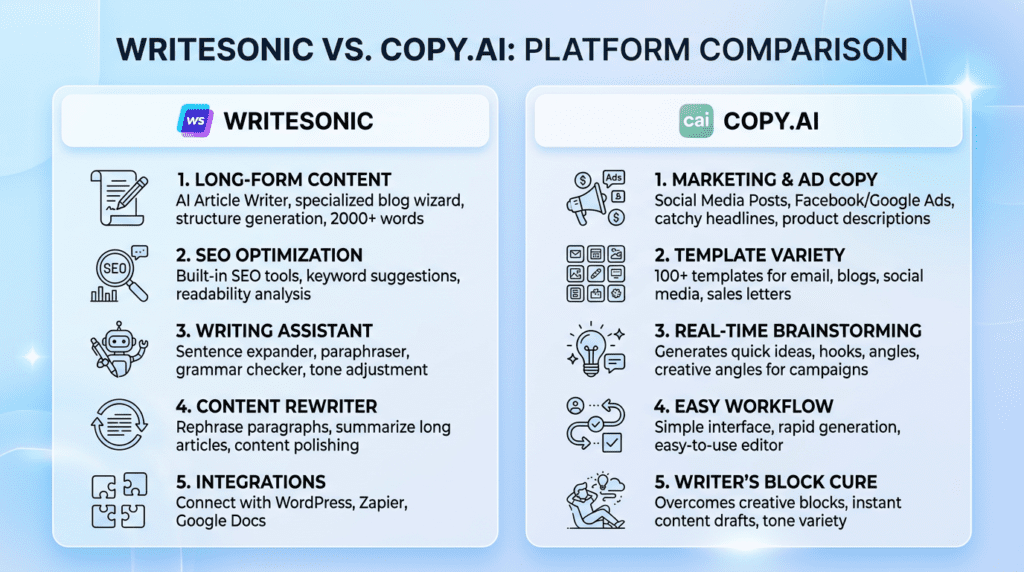
Complete Verdict Table
| Factor | Winner | Key Reason |
|---|---|---|
| Long-Form Content | Writesonic | More structured workflows and dedicated tools like Sonic Editor and Photosonic. |
| Marketing & Ad Copy | Copy.ai | Superior templates and workflows specifically for sales and marketing copy. |
| Ease of Use | Copy.ai | Cleaner, more intuitive interface that is easier for beginners to master quickly. |
| Feature Set & Tools | Writesonic | Broader feature set including an AI article writer, image generator, and SEO tools. |
| Pricing & Value | Tie | Both offer competitive pricing, but the best value depends on your specific usage. |
| Team Collaboration | Copy.ai | Better designed for team workflows and managing multiple projects. |
| Best Overall | Writesonic | The more versatile, all-in-one platform for content creators and SEOs. |
Best For
- Writesonic: Best for bloggers, SEO professionals, and content marketers who need a comprehensive tool for creating long-form, search-optimized articles and require built-in image generation. If your content strategy leans heavily into detailed blog posts, evergreen articles, or even e-books, Writesonic offers the structured environment and advanced features to support that.
- Copy.ai: Best for marketing teams, social media managers, and copywriters who primarily focus on short-form copy, ad campaigns, and sales emails. Its strength lies in quickly generating compelling, conversion-focused text for various marketing channels, making it a go-to for agencies and businesses with high-volume, short-form content needs.
Not Ideal For
- Writesonic: Not ideal for users who need the absolute simplest interface for quick, one-off marketing copy tasks or those whose primary output is only short-form content. While it can do short-form, its power is often overkill for simple social media captions if that’s all you need.
- Copy.ai: Not ideal for users who need to produce full-length, SEO-optimized blog posts from start to finish within a single, guided workflow. While it has a blog post wizard, it often requires more manual assembly and editing for comprehensive, long-form articles compared to Writesonic’s dedicated tools.
Bottom Line
Choose Writesonic if you need a powerful, all-in-one content creation suite for articles, blog posts, and SEO, especially if long-form content is your bread and butter. It’s built for creators looking to streamline their entire content production process, from ideation to image generation. Choose Copy.ai if your primary need is generating high-quality marketing copy, social media content, and sales materials with a strong focus on team collaboration and an intuitive, user-friendly experience for rapid content generation.
How Writesonic and Copy.ai Pricing Models Compare in 2026
Understanding the cost of an AI writing tool goes beyond just looking at a monthly fee; it’s about aligning the platform’s capabilities with your specific content needs and growth trajectory. Both Writesonic and Copy.ai offer different structures, and what looks like a bargain upfront might not be the best value long-term. This section dives into the real-world implications of their pricing models in 2026.
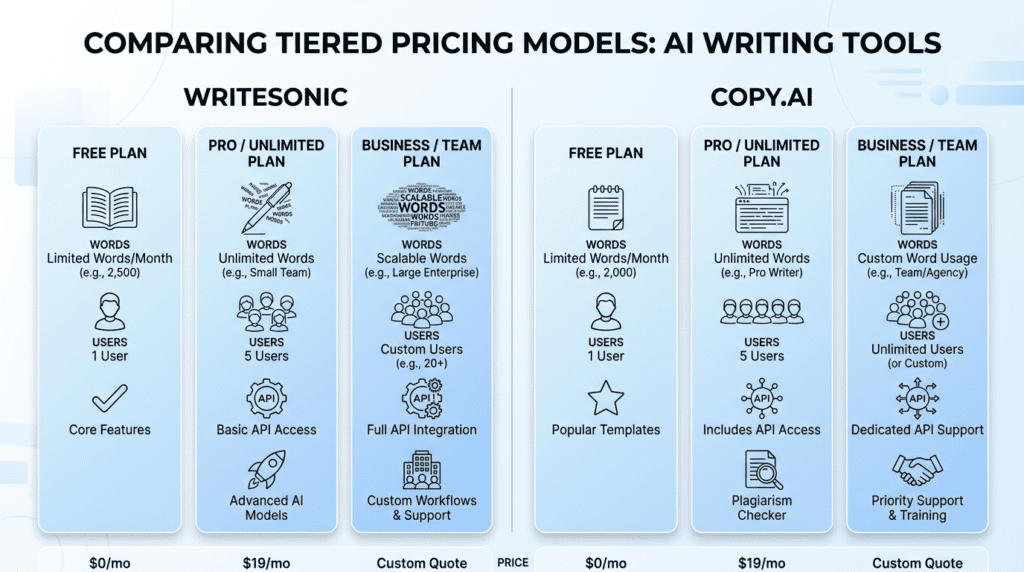
Analyzing Writesonic’s Tiered Plans: Who is the Business Plan For?
Writesonic structures its pricing with a clear tiered approach, designed to scale with users from individual creators to large enterprises. They typically offer a Free plan, an Unlimited plan, a Business plan, and custom Enterprise solutions.
The Free plan is a great starting point, usually offering a limited number of words (e.g., 10,000 words per month) to test out core features like the AI Article Writer and various short-form templates. This is ideal for solopreneurs or hobbyists just dipping their toes into AI content generation.
The Unlimited plan (often starting around $20/month when billed annually) is where Writesonic aims to serve individual content creators and small businesses with higher volume needs. While it offers “unlimited” words, it’s important to note that this often comes with a “fair use” policy, meaning extremely high, continuous usage might be subject to review or slower generation speeds. This plan typically includes access to most templates, the AI Article Writer, and basic support, but usually limits to one user seat.
The Business plan (typically starting around $99/month when billed annually) is designed for growing teams and agencies. This tier significantly expands on the Unlimited plan by offering multiple user seats (e.g., 5+ users), higher quality word generation options, and often includes more advanced features like API access, custom brand voice, and priority support. This is the sweet spot for small marketing teams, digital agencies, or larger content operations that need to manage multiple projects and collaborate effectively. The API access is particularly valuable for businesses looking to integrate Writesonic’s AI capabilities directly into their own applications or workflows, enabling bulk content generation or automated processes.
For very large organizations or those with highly specific requirements, Writesonic offers Enterprise plans. These are custom-quoted and include features like dedicated account management, advanced security, custom AI models, and extensive API usage.
Understanding Copy.ai’s Pro Plan and Team Pricing
Copy.ai takes a slightly different approach, primarily focusing on a robust Pro plan for most users beyond their Free tier, and then custom solutions for larger teams.
The Free plan for Copy.ai is also a solid entry point, typically providing a generous word count (e.g., 2,000 words per month) to explore its wide array of marketing-focused templates and the chat interface. It’s excellent for individuals who need to generate quick snippets of copy or test out different marketing angles.
The Pro plan (often starting around $49/month when billed annually) is Copy.ai’s flagship offering for individuals and small to medium-sized teams. A key differentiator here is its “unlimited” word generation, which, similar to Writesonic, operates under a fair use policy but generally allows for very high volume without immediate throttling for typical business use. This plan includes access to all templates, the long-form editor, the Infobase feature (for storing brand information), and the powerful Workflows tool. It also typically includes one user seat, with additional seats available for an extra cost (e.g., $35/user/month). The Pro plan is particularly attractive for marketing professionals, social media managers, and small agencies who prioritize marketing copy and workflow automation.
For larger organizations, Copy.ai offers custom team pricing. This isn’t a fixed tier but rather a tailored solution that includes more user seats, advanced collaboration features, dedicated support, and potentially custom integrations. This model caters to enterprises that need a scalable solution for multiple teams, ensuring brand consistency and efficient content production across departments.
The Hidden Costs: Word Count Limits and “Unlimited” Plans
The term “unlimited” in AI writing tools can often be a source of confusion and, for heavy users, a hidden frustration. While both Writesonic’s Unlimited/Pro plans and Copy.ai’s Pro plan advertise “unlimited” word generation, it’s crucial to understand the practical implications.
These “unlimited” claims are almost always subject to a “fair use” policy. This means that while there isn’t a hard numerical cap, providers monitor usage to prevent abuse or excessive strain on their systems. For the vast majority of users, this isn’t an issue; you can generate thousands, even hundreds of thousands, of words without hitting a wall. However, if you’re attempting to generate millions of words per month, or using the tool for continuous, automated bulk content generation far beyond typical human-like output, you might encounter slower generation speeds, temporary account restrictions, or even a request to upgrade to an enterprise plan.
The trade-off here is that true, unthrottled “unlimited” access would be significantly more expensive for the provider, and thus for the user. These fair use policies allow them to offer a more accessible price point for high-volume usage. For businesses relying on AI for critical, high-volume content, it’s wise to clarify the specifics of the fair use policy or consider an enterprise plan that explicitly guarantees higher throughput. The hidden cost isn’t always an overage charge, but rather potential workflow interruptions or a reduction in output quality/speed if you push the limits too hard.
Which Platform Offers Better Value for Money?
Determining which platform offers better value for money largely depends on your specific use case, team size, and content goals. There’s no single winner, as the optimal choice is highly individualized.
For the solopreneur or individual content creator focused on long-form content like blog posts and articles, Writesonic’s Unlimited plan (around $20/month annually) often provides superior value. Its dedicated AI Article Writer and SEO-focused features make it easier to produce comprehensive, search-optimized content efficiently. If your primary need is short, punchy marketing copy for social media or ads, Copy.ai’s Pro plan (around $49/month annually) might offer better value, even at a higher price point, due to its specialized templates and intuitive workflow for those specific tasks.
For a small marketing team (2-5 users), the decision becomes more nuanced. If the team’s core output is long-form blog content, SEO articles, and needs image generation, Writesonic’s Business plan (starting around $99/month annually for multiple users) presents a strong value proposition. It offers the necessary user seats and advanced features. However, if the team primarily focuses on generating high volumes of marketing copy, ad creatives, email sequences, and leveraging brand voice consistency, Copy.ai’s Pro plan with additional user seats (e.g., $49 + $35/user/month) or its custom team pricing might be more cost-effective and workflow-aligned. Copy.ai’s Workflows feature can significantly streamline repetitive marketing tasks, adding substantial value.
For large agencies or enterprise clients, both platforms offer custom solutions. Here, value is less about the per-word cost and more about API access, custom model training, dedicated support, security, and seamless integration into existing tech stacks. Writesonic’s strong API capabilities and focus on SEO content make it a contender for agencies managing large content portfolios. Copy.ai’s robust workflow automation and brand voice management make it highly valuable for agencies needing to maintain consistent messaging across many client accounts. The “better value” at this scale comes down to which platform’s enterprise features align more closely with the agency’s specific operational needs and client deliverables.
Core Feature Showdown: Content Creation Workflows
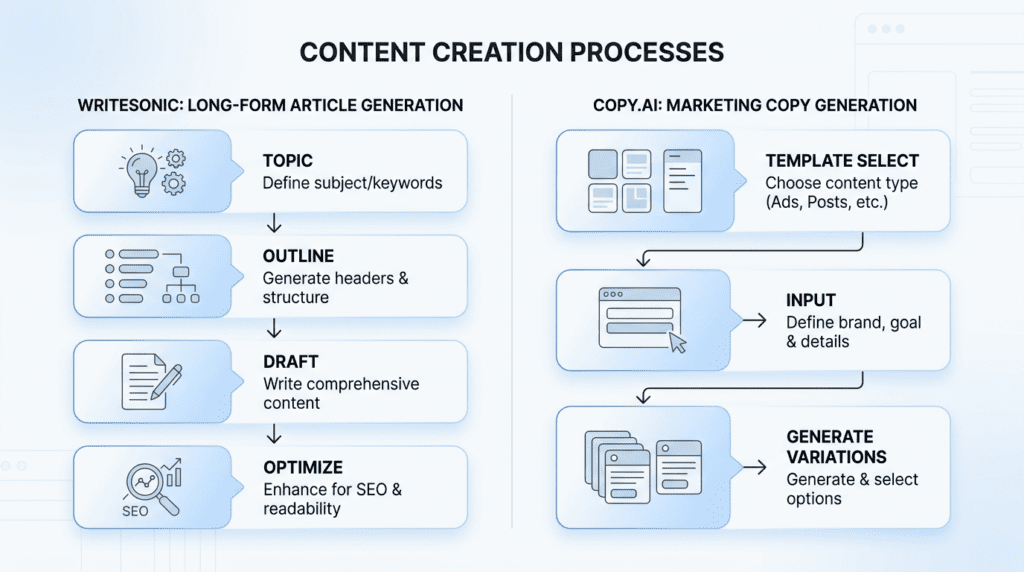
The true power of an AI writing tool lies not just in its ability to generate text, but in how seamlessly it integrates into your content creation workflow. Both Writesonic and Copy.ai approach this differently, catering to distinct user needs and content types. This section dissects their core functionalities to reveal where each platform truly excels.
Long-Form Content: Writesonic’s AI Article Writer vs. Copy.ai’s Editor
When it comes to generating extensive content like blog posts, articles, or even e-books, Writesonic and Copy.ai offer fundamentally different experiences.
Writesonic’s AI Article Writer (e.g., Article Writer 5.0) is designed as a guided, step-by-step process. Users typically start by providing a topic or keyword, and the tool helps generate an outline, then an introduction, followed by body paragraphs for each section, and finally a conclusion. This structured approach is incredibly beneficial for users who need a clear, linear path to producing a complete article. It’s particularly strong for SEO professionals and bloggers who need to ensure their content covers specific points and maintains a logical flow. The output often feels more cohesive and ready for minor edits, reducing the time spent on structuring and organizing thoughts. For a beginner, this guided workflow can significantly reduce the intimidation factor of writing a full article from scratch.
In contrast, Copy.ai’s long-form editor is more of a flexible canvas. While it offers templates for blog posts, it doesn’t enforce the same rigid step-by-step process as Writesonic. Users typically start with a blank document and use the integrated chat feature or various short-form tools to generate sections, paragraphs, or ideas, then piece them together. This approach offers more creative freedom and is excellent for experienced writers who prefer to maintain more control over the content’s direction and structure. It’s less about a “one-click article” and more about providing an AI assistant within a flexible writing environment. While powerful, it can present a steeper learning curve for beginners who might struggle with how to best leverage the various tools to build a complete article without a clear roadmap.
Marketing & Ad Copy: Where Copy.ai’s Template Library Shines
For short-form, persuasive content designed to drive action, Copy.ai’s template library is a standout feature. It boasts an extensive collection of specialized templates tailored for virtually every marketing need imaginable. Think Facebook Ad Headlines, Google Ad Descriptions, Instagram Captions, Email Subject Lines, Sales Copy, Landing Page Hero Text, Product Descriptions, and more.
What makes Copy.ai shine here is the sheer breadth and depth of its templates, combined with an intuitive interface that guides users to input specific details relevant to their marketing goals. For example, when generating Facebook Ad copy, the template prompts for audience, product benefits, and desired call to action, leading to highly relevant and effective output. This specialization means the AI is trained to understand the nuances of marketing language, producing copy that is often more engaging, conversion-focused, and aligned with specific platforms’ best practices. A small business owner needing to quickly spin up multiple ad variations or a social media manager looking for fresh caption ideas will find Copy.ai’s marketing templates invaluable, saving hours of brainstorming and drafting.
While Writesonic also offers a good selection of marketing templates, Copy.ai’s focus and depth in this area give it an edge for users whose primary need is high-quality, diverse marketing and ad copy generation.
SEO & Factual Accuracy: Writesonic’s Surfer Integration and Fact-Checking
For content creators and businesses prioritizing search engine optimization (SEO) and factual accuracy, Writesonic offers distinct advantages. Its commitment to producing SEO-friendly content is evident in features like its Surfer SEO integration. This integration allows users to generate content while simultaneously optimizing it for target keywords, content length, readability, and other on-page SEO factors directly within the Writesonic platform. This streamlines the workflow for SEO specialists and content marketers, ensuring that articles are not only well-written but also highly discoverable.
Furthermore, Writesonic has made strides in addressing factual accuracy, a common concern with AI-generated content. Features like its Infobase allow users to feed the AI specific, verified information about their brand, products, or industry, ensuring that the generated content is consistent and accurate. Additionally, Writesonic’s Chatsonic (its conversational AI) can access real-time information from the web, which helps in generating more current and factually grounded content compared to models trained on older datasets. This focus on verifiable information and integration with SEO tools makes Writesonic a stronger choice for those who cannot compromise on search performance or factual integrity.
Copy.ai, while capable of generating good content, generally requires more manual effort or external tools for robust SEO optimization and fact-checking. Its strength lies more in creative marketing copy than in deep, data-driven SEO content.
AI Chat & Research: Chatsonic vs. Copy.ai Chat
The rise of conversational AI has transformed how users interact with writing tools, turning them into powerful research and brainstorming assistants. Both Writesonic and Copy.ai have integrated chat functionalities, but with different strengths.
Writesonic’s Chatsonic is a versatile conversational AI that goes beyond simple text generation. It’s known for its ability to access real-time information from the internet, making it excellent for research on current events or rapidly evolving topics. Beyond text, Chatsonic can also generate images, making it a multi-modal AI assistant. For a blogger needing to research a trending topic, brainstorm article ideas, or even generate a quick image for a social media post, Chatsonic offers a comprehensive solution within a single interface. Its ability to pull in fresh data is a significant advantage for content that needs to be timely and relevant.
Copy.ai Chat is deeply integrated into the platform’s workflow, acting as a powerful assistant for brainstorming, refining copy, and leveraging stored brand information. While it may not have the real-time web access of Chatsonic for general knowledge, its strength lies in its connection to Copy.ai’s Infobase. Users can feed their brand guidelines, product details, and company information into Infobase, and then use Copy.ai Chat to generate content that adheres strictly to their brand voice and factual accuracy. This makes it incredibly valuable for marketing teams needing to maintain consistent messaging across various campaigns. It’s also excellent for quickly generating variations of existing copy or expanding on specific points within a document.
The choice between the two often comes down to the primary use case: Chatsonic for broad, real-time research and multi-modal output, and Copy.ai Chat for brand-specific content generation and leveraging stored knowledge.
Comparing User Experience and Ease of Use
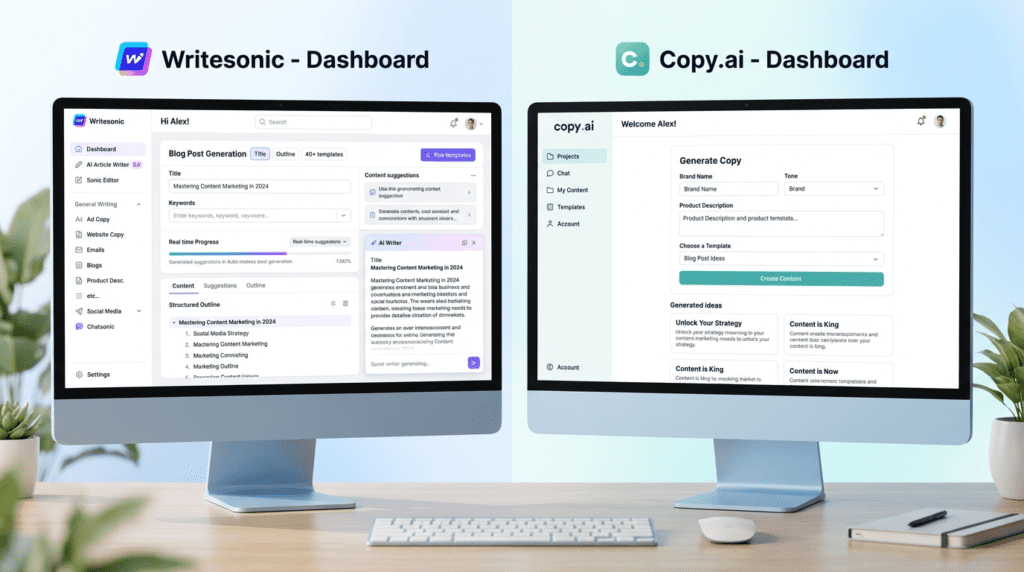
An AI writing tool, no matter how powerful, is only effective if users can navigate it easily and integrate it into their daily routines. The user experience (UX) and ease of use are critical factors, especially for beginners or teams adopting new software. This section compares how Writesonic vs Copy.ai stack up in terms of their interfaces and overall usability.
First Impressions: Onboarding and Initial Setup
The first interaction with any new software sets the tone for the entire user journey. Both Writesonic and Copy.ai generally offer smooth onboarding processes.
Writesonic typically guides new users through a quick tour of its main features, highlighting key tools like the AI Article Writer and various templates. The dashboard is usually well-organized, with categories for different content types (e.g., articles, ads, e-commerce). The initial setup often involves selecting your primary use case, which helps tailor the initial recommendations. For a beginner, this guided approach can feel reassuring, quickly pointing them toward the most relevant tools for their needs.
Copy.ai also provides a straightforward initial setup. Its dashboard often feels a bit cleaner and less cluttered on first glance, emphasizing its chat interface and a broad list of templates. New users are quickly introduced to the concept of generating copy by selecting a template or starting a new project. Copy.ai’s initial experience often feels very direct, allowing users to jump into content generation almost immediately, which can be appealing for those eager to start experimenting.
The Learning Curve: Which Tool is More Beginner-Friendly?
When considering the learning curve, Copy.ai generally holds an edge for being more beginner-friendly, especially for those focused on short-form marketing copy. Its interface is often described as intuitive, with a clear layout and straightforward prompts within its templates. The chat interface is also very natural for anyone familiar with conversational AI, making it easy to ask for content or ideas. A new user can often generate their first piece of usable marketing copy within minutes of signing up, without needing to consult extensive documentation.
Writesonic, while also user-friendly, can have a slightly steeper learning curve, particularly when utilizing its more advanced features like the AI Article Writer or SEO integrations. The multi-step process for long-form content, while powerful, requires users to understand each stage and provide appropriate inputs. For someone new to AI writing or content strategy, mastering the full potential of Writesonic might take a bit more time and exploration. However, for those who need its specific advanced capabilities, the investment in learning pays off.
Daily Workflow: Navigating the Dashboards and Finding Tools
The efficiency of daily workflow depends heavily on how well the dashboard is designed and how easily users can find the tools they need.
Copy.ai’s dashboard is often praised for its clean, minimalist design. The left-hand navigation typically lists project folders, the chat interface, and a search bar for templates. This makes it very easy to quickly jump between projects, start new content, or find a specific template. The integrated chat feature also means users don’t have to switch between different tools for brainstorming and generation, streamlining the process. For a marketing professional who needs to generate various types of copy throughout the day, Copy.ai’s layout supports a fast, iterative workflow.
Writesonic’s dashboard is also well-organized but tends to present more options upfront, reflecting its broader feature set. Users can typically navigate through categories like “Articles & Blogs,” “Ads & Marketing Tools,” “eCommerce,” etc. While this provides comprehensive access, it can sometimes feel a bit more crowded than Copy.ai’s minimalist approach. Finding a specific template might involve a few more clicks or using the search function. However, for users who frequently switch between different content types – from blog posts to product descriptions to social media updates – Writesonic’s categorized approach can be very efficient once familiarized.
Organizing Your Work: Project and Document Management
Effective project and document management are crucial for individuals and teams to keep track of their generated content and maintain consistency.
Copy.ai offers robust project management features. Users can create dedicated project folders to organize their generated copy, making it easy to store and retrieve content for specific campaigns or clients. The platform also allows for version control within documents, so you can revisit previous iterations of your copy. This is particularly useful for marketing teams that need to manage multiple campaigns simultaneously and ensure brand consistency. Export options are also straightforward, allowing users to download content in various formats.
Writesonic also provides good organizational capabilities. Users can save their generated content within the platform, often associated with the specific tool used (e.g., an article generated by the AI Article Writer will be saved in that section). It supports folder creation for better organization, which is essential for managing a growing library of content. While its project management might not be as overtly emphasized as Copy.ai’s, it provides the necessary tools for users to keep their work tidy and accessible. For teams, the ability to share and collaborate on documents within the platform is also a key feature for maintaining workflow.
Beyond Writing: How Extra Features Impact Your Choice
Modern AI writers are more than just text generators. They’re evolving into comprehensive content creation hubs, and the “bonus” features can often be the deciding factor when you’re weighing `Writesonic vs Copy.ai`. These aren’t just nice-to-haves; they can significantly streamline your workflow and reduce your reliance on other tools.
AI Image Generation: Writesonic’s Built-in Photosonic
One of Writesonic’s standout features is its integrated AI image generator, Photosonic. This isn’t just a separate tool tacked on; it’s built right into the platform, making it incredibly convenient for content creators. Think about it: you’re writing a blog post, and you need a unique, relevant image to break up the text or illustrate a point. Instead of leaving Writesonic, going to a separate AI image tool, generating images, downloading them, and then uploading them back, you can do it all within the same interface.
This integration is a huge time-saver, especially for bloggers, content marketers, and small business owners who might not have a dedicated graphic designer. For a beginner, it removes the friction of managing multiple subscriptions and learning different interfaces. As your usage grows, the ability to quickly generate custom visuals for social media posts, blog headers, or even simple infographics directly within your writing tool becomes incredibly valuable. It means you can maintain a consistent visual style without extra effort. The main limitation is that while Photosonic is good for quick, functional images, it might not replace a dedicated graphic designer for highly complex or artistic visual needs.
Brand Voice and Tone: Which Tool Adapts Better to Your Style?
Maintaining a consistent brand voice is critical for any business, whether you’re a solopreneur or a large agency. Both `Writesonic vs Copy.ai` offer ways to guide the AI’s output, but they approach it differently.
Writesonic allows you to set a specific tone for each generation, choosing from options like “professional,” “witty,” “bold,” or “casual.” For more advanced users on higher plans, you can also create custom brand voices by providing examples of your existing content. This helps the AI learn your unique style, word choice, and even sentence structure, ensuring that everything from a blog post to an email sounds authentically “you.” This feature becomes increasingly valuable as you scale your content production, preventing your brand’s messaging from feeling disjointed.
Copy.ai also offers tone options and has a “Brand Voice” feature, particularly strong within its “Infobase” (a knowledge base where you can store brand information, product details, and style guides). By feeding Copy.ai your brand’s core messaging, values, and preferred terminology, it can generate copy that aligns closely with your established identity. This is particularly useful for marketing teams who need to ensure all copywriters, human or AI, adhere to strict brand guidelines. While both tools aim for consistency, Copy.ai’s Infobase feels more geared towards a structured, team-based approach to brand management, making it slightly more robust for larger organizations with complex brand guidelines.
Team Collaboration and Workflow Management
For teams, the ability to collaborate seamlessly within an AI writing platform is a game-changer. This is an area where Copy.ai generally shines brighter. Its interface and features are designed with team workflows in mind. You can invite multiple team members, assign roles, and manage projects within shared workspaces. This means a marketing manager can set up a project for a new campaign, and team members can contribute to different pieces of copy (ads, emails, landing pages) all within the same environment. The “Workflows” feature in Copy.ai, which allows you to build multi-step content generation processes, is also excellent for standardizing team output and ensuring everyone follows the same creative brief.
Writesonic also offers team features, allowing multiple users to access the same account and share credits. However, its collaboration tools aren’t as deeply integrated or as intuitive for managing complex, multi-person content projects as Copy.ai’s. While Writesonic is perfectly capable for small teams or individual users who occasionally share access, Copy.ai’s project management and shared knowledge base capabilities make it a stronger contender for marketing agencies or larger in-house content teams that need robust collaboration features.
Real-World Scenarios: Which Tool is Right for Your Job?
Moving beyond feature lists, let’s look at how `Writesonic vs Copy.ai` perform in practical, everyday content creation tasks. Understanding these scenarios can help you pinpoint which tool truly aligns with your specific needs.
For the SEO Blogger: Creating a 2,000-Word Article
If you’re an SEO blogger, your main goal is likely to produce long-form, high-quality, search-engine-optimized articles that rank well. In this scenario, Writesonic is the clear frontrunner. Its AI Article Writer 5.0 is specifically designed for this purpose. You start with a topic, it helps you generate an outline, research points, and then writes sections of the article, often integrating with tools like Surfer SEO for real-time optimization suggestions. The process is guided, step-by-step, and aims to produce a comprehensive piece of content.
While Copy.ai has a long-form editor, it’s more of a blank canvas where you generate sections of text using various tools and then piece them together. It lacks the structured, guided workflow that Writesonic offers for full article creation. For an SEO blogger, the ability to generate a full draft, check for factual accuracy (a feature Writesonic emphasizes), and optimize for keywords all within one tool significantly reduces the time and effort required. You’ll still need to edit and fact-check, but Writesonic gives you a much stronger starting point for a 2,000-word piece.
For the Marketing Agency: Running a Facebook Ad Campaign
Marketing agencies thrive on efficiency, consistency, and the ability to generate a high volume of diverse copy quickly. When it comes to running a Facebook Ad campaign, Copy.ai’s strengths truly shine. Its extensive library of marketing-specific templates – including multiple variations for Facebook Ads, headlines, primary text, and calls to action – makes it incredibly efficient. An agency can input a few key details about a product or service, and Copy.ai will churn out dozens of compelling ad copy options in minutes.
Furthermore, Copy.ai’s team collaboration features and its “Workflows” are invaluable here. An agency can create a workflow for ad creation, ensuring that every ad follows the client’s brand voice and includes necessary elements. This allows different team members to work on various parts of the campaign simultaneously, from ad copy to landing page headlines, all while maintaining consistency. Writesonic can generate ad copy, but its template library isn’t as specialized or as extensive for pure marketing applications, and its collaboration features aren’t as robust for agency-level project management.
For the Small Business Owner: Writing Website Copy and Emails
For a small business owner, the choice between `Writesonic vs Copy.ai` depends heavily on their primary content needs.
If the small business owner primarily focuses on content marketing, such as maintaining a blog to drive organic traffic, Writesonic might be the better fit. Its ability to generate longer articles, optimize for SEO, and even create basic images can cover a significant portion of their content strategy. They might struggle a bit with the initial learning curve, but the long-term benefit of having a more comprehensive content creation tool could outweigh that.
However, if the small business owner’s priority is direct marketing – think sales emails, landing page copy, product descriptions for an e-commerce store, or social media posts – then Copy.ai is likely the stronger choice. Its user-friendly interface and specialized marketing templates make it incredibly easy to generate persuasive copy quickly. For someone who needs to write a compelling email sequence or refresh their website’s “About Us” page without getting bogged down in complex features, Copy.ai offers a more direct and less intimidating path to high-quality marketing copy. The decision here boils down to whether their content strategy leans more towards attracting traffic (Writesonic) or converting leads (Copy.ai).
Honest Take: The Key Trade-Offs You Must Consider
No AI tool is perfect, and understanding the inherent trade-offs is crucial for making an informed decision between `Writesonic vs Copy.ai`. Both platforms excel in different areas, and choosing one often means consciously accepting certain limitations in exchange for specific strengths.
The Writesonic Trade-Off: Sacrificing Simplicity for Power
Writesonic is undeniably powerful. It’s designed to be a comprehensive, all-in-one content creation suite, especially for long-form content and SEO. It offers a wider array of features, including the AI Article Writer, Photosonic for images, and integrations that cater to a broad spectrum of content needs.
However, this power comes with a trade-off: simplicity. For a complete beginner, Writesonic can feel a bit overwhelming. The interface, while functional, isn’t as clean or intuitive as Copy.ai’s, and the sheer number of options can lead to a steeper learning curve. You might find yourself spending more time navigating menus or understanding different workflows, especially if your needs are very specific and don’t require the full suite of tools. What gets easier over time is mastering its specific workflows, like the Article Writer. What can become frustrating is if you only need a quick piece of short-form copy and have to wade through features you don’t use. Most marketing pages highlight its versatility, but they often gloss over the fact that this versatility can mean a less streamlined experience for single-purpose tasks.
The Copy.ai Trade-Off: Sacrificing All-in-One Features for Focus
Copy.ai, on the other hand, makes a deliberate choice to focus primarily on marketing and sales copy. This specialization is its greatest strength, leading to a highly intuitive interface, an extensive library of marketing-specific templates, and robust team collaboration features. It’s incredibly easy for beginners to jump in and start generating high-quality short-form content almost immediately.
The trade-off here is that you sacrifice the “all-in-one” capabilities that Writesonic offers. If your content strategy requires long-form articles, integrated SEO tools, or AI image generation, Copy.ai won’t be able to handle those tasks natively. You’ll find yourself needing to subscribe to additional tools or piece together solutions, which can negate some of the simplicity benefits. For a user who primarily needs blog posts, Copy.ai’s long-form editor, while functional, won’t provide the guided, comprehensive experience of Writesonic’s Article Writer. It’s a tool that does a few things exceptionally well, but it doesn’t try to do everything. This focus means a smoother experience for its target audience, but a less versatile one for those with broader content needs.
Final Recommendation: How to Make Your Decision in 60 Seconds

Making the right choice between Writesonic and Copy.ai hinges on your primary goals and workflow. Both are powerful AI writing assistants, but their strengths are tailored to different needs.
Choose Writesonic if…
You are a content creator, blogger, or SEO specialist who prioritizes long-form, search-optimized content and desires an all-in-one tool. If your work frequently involves crafting detailed articles, blog posts, or landing pages where SEO is paramount, Writesonic’s structured workflow and integrated SEO features, as discussed in the “For the SEO Blogger” section, will be highly beneficial. Furthermore, if the convenience of having AI image generation (via Photosonic) and robust brand voice adaptation within a single platform appeals to you, Writesonic offers that comprehensive package.
Choose Copy.ai if…
You are a marketer, copywriter, or part of a team focused on generating high volumes of sales copy, ads, and social media content with an emphasis on ease of use and rapid iteration. Copy.ai excels at producing short-form, impactful marketing collateral quickly, as highlighted in the “For the Marketing Agency” scenario. Its intuitive interface and strong team collaboration features make it ideal for agencies or in-house marketing teams needing to streamline content production for campaigns across various channels.
Is There a Better Alternative?
While Writesonic and Copy.ai cover a broad spectrum of needs, users with larger budgets seeking the most advanced features, extensive team controls, and deeper integrations might consider premium alternatives like Jasper AI. Jasper often caters to enterprise-level requirements, offering a more robust suite for complex content strategies.
Frequently Asked Questions (FAQ)
Do Writesonic and Copy.ai have free trials?
Yes, both Writesonic and Copy.ai offer free plans or trials that allow users to test their features and generate a limited amount of content before committing to a paid subscription.
Which tool produces more accurate, plagiarism-free content?
Both tools are designed to generate original and unique content, but AI models can occasionally produce outputs that are factually incorrect or inadvertently similar to existing text; therefore, human review and fact-checking are always recommended to ensure accuracy and prevent plagiarism.
Can I use Writesonic or Copy.ai for academic writing?
No, these tools are generally not suitable for academic writing due to the strict requirements for originality, citation, and critical analysis that typically cannot be met by AI-generated content.
How does the quality of AI-generated content compare to a human writer?
AI-generated content from both platforms can be highly proficient and grammatically correct, serving as an excellent starting point or draft, but it often lacks the nuanced understanding, emotional depth, and unique perspective that a skilled human writer brings.
Which platform has better customer support?
Both platforms offer standard customer support channels, including help documentation, email support, and often in-app chat, with user experiences varying but generally being positive for both.
Can I cancel my subscription at any time?
Yes, both Writesonic and Copy.ai typically offer flexible subscription models that allow users to cancel or downgrade their plans at any time, though specific terms may vary and should be checked on their respective websites.