
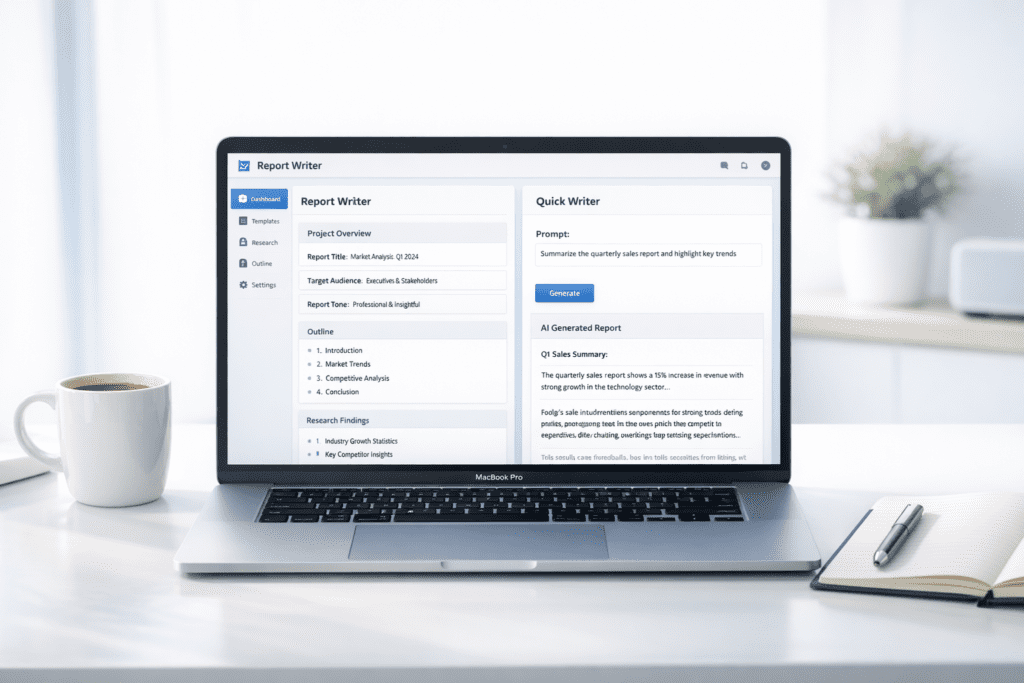
What if you could turn a rough idea into a clear, impactful speech in just a few minutes? That’s exactly where AI Tools for Speech Writing are starting to change the way people approach speeches.
From my research, most people in the US don’t struggle with ideas. They struggle with structure, flow, and delivery. Whether it’s a business presentation, a wedding speech, or a classroom talk, getting the words right takes time. That’s where AI writing tools and text generators step in and help simplify the process.
Here’s what I noticed. Modern AI powered by artificial intelligence and large language models can now generate speech drafts, refine tone, and even help you brainstorm ideas when you’re staring at a blank page. Instead of spending hours stuck in the writing process, you can move faster and focus more on delivery.
Quick Picks for the Best AI Tools for Speech Writing
Let’s keep it simple. Not every AI tool works the same way, especially when it comes to speechwriting.
Here are some of the best options based on real use cases.
Quick Recommendation: AI Tools for Speech Writing Snapshot (2026)
Best Overall: ChatGPT
Best for: Users who want flexible speech writing for different occasions and styles
Best Budget Option: Rytr
Best for: Beginners creating simple speeches with minimal setup
Best for Research-Based Speeches: ElevenLabs
Best for: Users who want to practice and improve speech delivery with realistic AI voice output
Best for Research-Based Speeches: NotebookLM
Best for: Users creating speeches based on documents, data, or research
Now this is where people get confused. Many AI writing tools claim to generate speeches, but the output depends heavily on how the tool is built and how you use the prompt.
For example, someone preparing a wedding speech may prefer a conversational AI like ChatGPT, while a professional working on a keynote presentation might lean toward tools that offer better structure and customization.
That said, there isn’t a single best AI writing tool for every situation. The right choice depends on your goal, whether you want to generate ideas, refine your message, or practice delivery.
Comparison Table of the Best AI Tools for Speech Writing
| Tool | Free Plan | Paid Pricing | Best For | Key Feature |
|---|---|---|---|---|
| ChatGPT | Yes | $20/month | All speeches | Generative AI |
| Rytr | Yes | $9/month | Beginners | Simple writing assistant |
| Jasper AI | No | $39/month+ | Persuasive speeches | AI writing software |
| Writesonic | Yes | $16/month+ | Fast drafts | Content generator |
| NotebookLM | Yes | Free | Research speeches | Context based AI |
| Gemini | Yes | Paid optional | Structured speeches | AI text generator |
| ElevenLabs | Yes | $5/month+ | Voice delivery | AI speech generator |
Here’s the thing. Pricing matters, but it’s not everything. Some tools focus more on content creation, while others focus on delivery or research.
Most beginners in the US usually start with a free AI tool to test how AI generates content. Once they understand the workflow, they move to paid tools that offer better customization and control.
7 Best AI Tools for Speech Writing
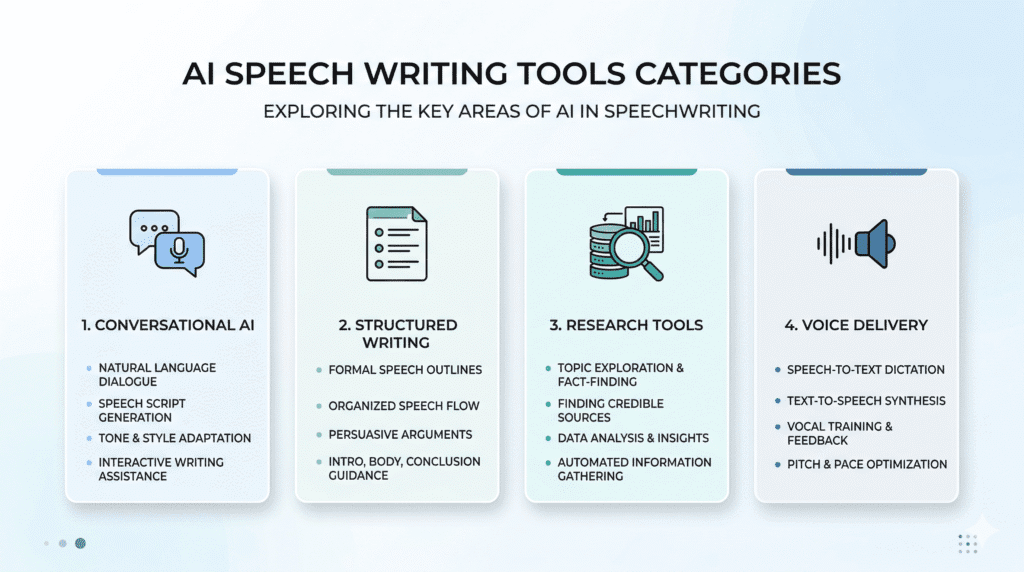
ChatGPT
ChatGPT is one of the most widely used AI writing tools, and honestly, it’s often the first tool people try when they start working on speech writing.
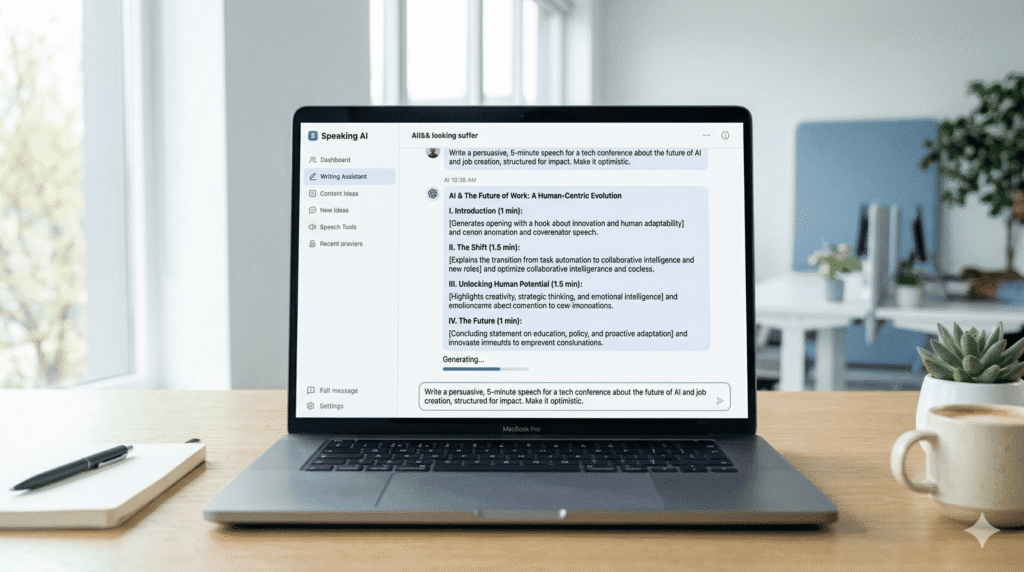
It works as a conversational AI writing assistant, which means you can guide it step by step using a prompt. Instead of generating a full speech in one go, you can refine sections, adjust tone, and even ask it to rewrite parts until it feels right.
Here’s what I noticed. People in the US use ChatGPT for everything from business presentations to wedding speeches because it adapts easily to different styles. Whether you want something persuasive, emotional, or informative, it can usually generate a solid starting point.
Key Features
• Prompt-based control: You guide the direction of the speech
• Conversational output: Makes the content feel more natural
• Multi-style writing: Supports different tones and formats
Pricing
• Free plan: Available
• Paid plan: Around $20/month
Pros & Cons
• Pros: Flexible, powerful, works for almost any speech
• Cons: Output quality depends on prompt clarity
Best For
• Use case: All types of speeches
Now this is where people get confused. ChatGPT can produce strong AI-generated content, but only if your prompt is detailed. A vague instruction like “write a speech” usually leads to generic output.
From my research, users who refine their prompts and iterate a few times tend to get much better results.
Rytr
Rytr is a beginner-friendly AI writing tool that focuses on simplicity. It doesn’t try to offer too many advanced features, which actually makes it easier to use if you’re new to AI.
Most people who are just starting out with speechwriting prefer tools like Rytr because the workflow is straightforward. You choose a tone, add a short prompt, and the tool generates content quickly.
For example, if you need a short presentation speech for a meeting, Rytr can generate a basic draft in minutes without much effort.
Key Features
• Templates: Pre-built formats for different speech types
• Tone options: Adjust emotional or formal tone
• Simple workflow: Easy to use for beginners
Pricing
• Free plan: Available
• Paid plans: Start around $9/month
Pros & Cons
• Pros: Affordable, easy to use
• Cons: Limited depth for complex speeches
Best For
• Use case: Beginners and quick speech drafts
Let’s keep it simple. Rytr works well for short speeches, but if you need something more detailed or persuasive, you might find it a bit limited.
Jasper AI
Jasper AI is a more advanced AI writing software designed for structured and persuasive content. It’s often used by professionals who need well-organized speeches, especially in business settings.
Here’s what I noticed. Marketing teams and professionals in the US often rely on Jasper when they need to create impactful presentations or keynote speeches. It focuses more on structure and clarity compared to general-purpose AI tools.
For example, someone preparing a keynote speech for a conference can use Jasper to generate a detailed outline and then expand each section into a full speech.
Key Features
• Long-form writing: Helps create structured speeches
• Templates: Supports different speech formats
• Workflow automation: Streamlines the writing process
Pricing
• Plans: Start around $39/month
Pros & Cons
• Pros: Powerful features, strong structure
• Cons: Higher cost compared to other tools
Best For
• Use case: Professionals and business speeches
Here’s the thing. Jasper works best when you already have a clear direction. It helps refine and structure your speech, but it may not feel as flexible as tools like ChatGPT for brainstorming.
Writesonic
Writesonic is known for speed, and that’s exactly where it stands out in speech writing. If you need to generate a draft quickly without overthinking structure, this AI writing tool usually delivers fast results.
Here’s what I noticed. People preparing last minute presentations often rely on tools like Writesonic because it helps them move from idea to draft in minutes. It doesn’t try to be overly complex, which makes it easier to use when you’re short on time.
That said, the output isn’t always polished. In most cases, you’ll need to refine the speech to make it sound more natural and less AI-generated.
Key Features
• Content generator: Quickly generate speech drafts
• Templates: Pre-built formats for different speech styles
• Chat-based writing: Similar experience to ChatGPT
Pricing
• Free plan: Available
• Paid plans: Start around $16/month
Pros & Cons
• Pros: Fast output, easy to use
• Cons: Needs editing for better flow
Best For
• Use case: Quick speech drafts and last minute writing
Here’s the thing. Writesonic works best when speed matters more than perfection. If you’re crafting a high impact speech, you’ll still need to spend time refining it.
NotebookLM
NotebookLM is a research focused AI tool, and it works differently compared to most general-purpose AI writing tools. Instead of just generating text, it uses your own documents and sources to create more context aware content.
Now this is where people get confused. NotebookLM doesn’t rely only on generic AI output. It builds speeches based on the information you provide, which makes it more accurate for research-based topics.
For example, if you upload notes or documents into NotebookLM, it can generate a structured speech that reflects your actual data instead of pulling random information.
Key Features
• Context aware writing: Uses your documents for better accuracy
• Summarization: Helps organize research into speech format
• Workflow integration: Works well with tools like Google Docs
Pricing
• Free plan: Currently free
Pros & Cons
• Pros: More accurate context, useful for research speeches
• Cons: Less creative compared to other AI tools
Best For
• Use case: Research based and informative speeches
Let’s be real for a second. If your speech depends on facts or specific data, NotebookLM can be more reliable than general AI tools. But if you want creativity or storytelling, it may feel a bit limited.
Gemini
Gemini is a structured generative AI tool developed for logical and well-organized content. It focuses more on clarity and reasoning rather than creativity.
From my research, students and professionals in the US often use Gemini when they need speeches that are clear and easy to follow, especially for educational or business settings.
For example, if you’re preparing a classroom presentation, Gemini can generate a well-structured speech that covers key points without unnecessary fluff.
Key Features
• AI text generator: Creates structured speech content
• Logical flow: Focuses on clarity and organization
• Google integration: Works with Google Docs and other tools
Pricing
• Free version: Available
• Paid plans: Optional upgrades
Pros & Cons
• Pros: Strong reasoning, clear structure
• Cons: Less emotional tone in speeches
Best For
• Use case: Structured and educational speeches
Here’s the thing. Gemini works well when you need clarity and logic, but it might not be the best choice for emotional or storytelling based speeches.
ElevenLabs
ElevenLabs is not a traditional AI writing tool. Instead, it focuses on voice generation, which makes it useful for practicing speech delivery.
Here’s what I noticed. Many people write their speech using one AI tool and then use ElevenLabs to hear how it sounds. This helps improve tone, pacing, and overall delivery.
For example, someone preparing for a keynote speech can convert their script into an AI voice and practice before presenting.
Key Features
• AI voice generation: Converts text into realistic speech
• Playback tools: Helps review delivery
• Speech enhancement: Improves clarity and tone
Pricing
• Free plan: Available
• Paid plans: Start around $5/month
Pros & Cons
• Pros: Realistic voice output, great for practice
• Cons: Not a full writing tool
Best For
• Use case: Practicing and improving speech delivery
Here’s the thing. ElevenLabs doesn’t help much with writing, but it adds value in the final stage when you’re preparing to deliver your speech.
Real Examples of AI Tools Generating Speeches
Now this is where things get interesting. Different AI tools can produce very different results, even when you use the same prompt.
Let’s say you use this prompt.
“Write a persuasive speech on climate change for college students.”
Tools like ChatGPT usually generate a conversational and engaging draft. Gemini tends to produce a more structured and logical version. Jasper focuses on clarity and persuasive tone.
There are exceptions, of course. A well detailed prompt can improve output across almost every AI tool. But if the prompt is weak, the speech often feels generic.
From my research, most users don’t rely on just one tool. They combine tools based on the stage of the writing process, whether it’s brainstorming, drafting, or practicing delivery.
Real AI-Generated Speech Example (Edited for Quality)
Let’s look at what an actual AI-generated speech looks like after light editing.
Prompt used:
Write a short motivational speech about overcoming failure for students
AI Generated Speech (Edited Version):
Failure is not the end of your journey – it’s the beginning of your growth.
Every successful person you admire has faced moments where things didn’t go as planned. The difference is, they didn’t stop. They learned, adapted, and kept moving forward.
When you fail, you gain something valuable – experience. You learn what doesn’t work, and that brings you one step closer to what does.
So the next time things don’t go your way, don’t see it as defeat. See it as progress.
Because success is not built on perfection.
It’s built on persistence.
Best AI Tools for Speech Writing Based on Use Case
Choosing the right AI tool depends on what kind of speech you’re trying to create. Not every tool works the same way, and honestly, using the wrong one can slow you down.
Here’s a simple breakdown based on real use cases.
• Best for wedding speech: ChatGPT for flexible and emotional tone
• Best for business speeches: Jasper AI for structured and persuasive content
• Best for students: Gemini for clear and logical delivery
• Best free AI writing: ChatGPT for general speechwriting
• Best for delivery: ElevenLabs for realistic AI voice practice
Here’s what I noticed. A wedding speech needs storytelling and emotion, while a business speech needs clarity and structure. That difference alone changes which AI writing tool works best.
Most beginners in the US start with a free AI tool and then move to more advanced options as their needs grow.
Before and After Using AI for Speech Writing
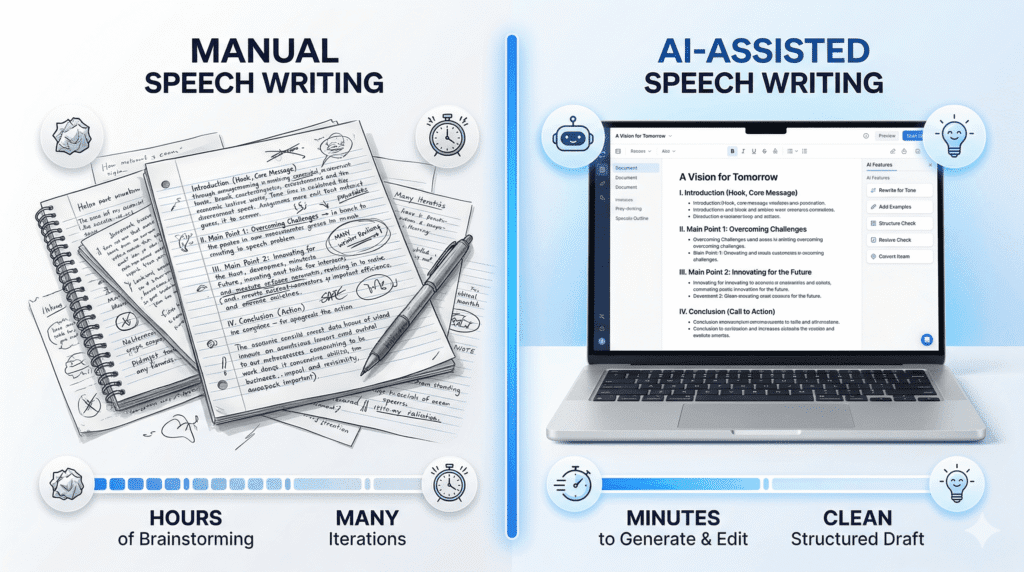
Let’s keep it simple. Writing a speech manually takes more time than people expect.
Without AI, the process usually looks like this.
• Brainstorming time: 30 to 60 minutes
• Drafting time: 1 to 2 hours
• Editing time: 30 minutes or more
Now compare that with using AI tools.
• Idea generation: Done in minutes
• Draft creation: Almost instant output
• Editing time: Still required but faster
Here’s the thing. The biggest difference isn’t just speed. It’s how easily you move past the blank page.
That said, this usually works, but not always. If the prompt is unclear, the AI-generated content can feel generic, and you may need to rewrite sections.
Before vs After Using AI for Speech Writing Example.
Here’s a simple example of how AI improves a speech.
Before (Manual Draft):
I want to talk about success. Success is important in life. You should work hard and never give up. If you fail, you should try again.
After (AI Refined Version):
Success is not just about winning – it’s about the journey you take to get there.
There will be moments when you feel like giving up. Moments when failure seems louder than your ambition. But those moments are not the end of your story.
They are the turning point.
Because every time you rise after falling, you become stronger, more focused, and closer to the success you’re chasing.
Step by Step Workflow for Writing a Speech with AI
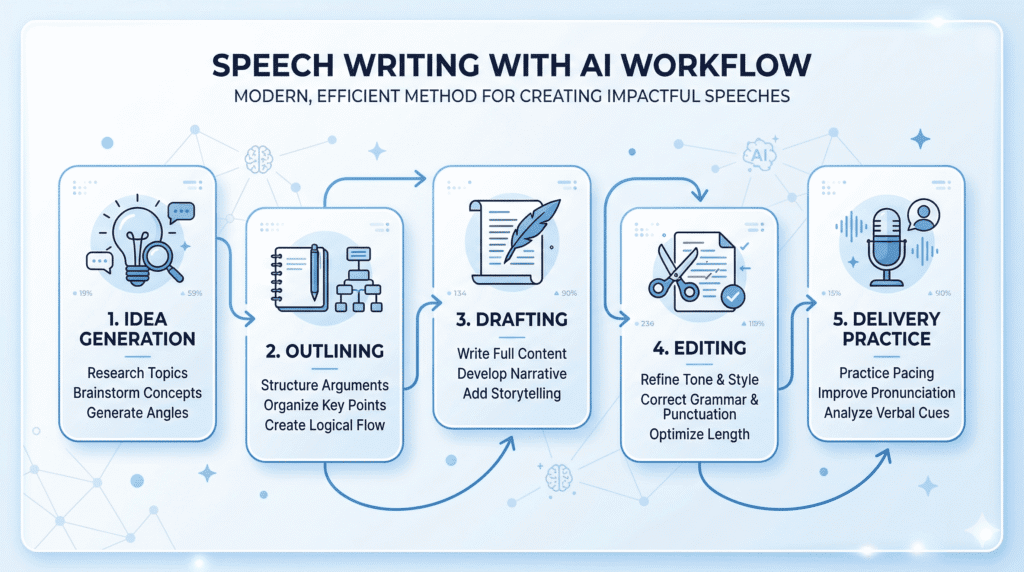
Now this is where people get confused. Using AI effectively is not just about typing a prompt and expecting a perfect speech.
A simple workflow makes a big difference.
• Step 1: Define your speech goal and audience
• Step 2: Use a prompt to generate initial ideas
• Step 3: Structure the speech into clear sections
• Step 4: Edit for tone and clarity
• Step 5: Practice delivery using AI voice tools
For example, many users combine ChatGPT for drafting and ElevenLabs for practicing delivery. This approach often produces better results than relying on a single tool.
Ready to Use AI Speech Templates with Prompts
Templates make speech writing much easier, especially if you’re not sure where to start.
Here are a few simple examples.
• Persuasive speech template:
Prompt: Write a 5 minute persuasive speech on climate change for college students with real world examples
• Business presentation template:
Prompt: Create a structured speech for a business presentation on marketing growth strategies
• Wedding speech template:
Prompt: Write a heartfelt wedding speech including personal memories and emotional tone
• Motivational speech template:
Prompt: Create a motivational speech about overcoming challenges with relatable examples
Here’s what I noticed. The more specific your prompt is, the better the output becomes. Generic prompts usually lead to generic speeches.
Best Prompts to Generate High Quality Speeches with AI
Let’s be real for a second. The quality of your speech depends heavily on your prompt.
A weak prompt might look like this.
“Write a speech”
A stronger version would be more detailed.
“Write a 5 minute persuasive speech for college students on climate change with examples and a clear structure”
• Include context: Audience and purpose of the speech
• Define tone: Formal, emotional, or persuasive
• Set length: Short or detailed speech
• Add examples: Improves clarity and engagement
From my research, people who spend more time refining their prompts usually get better results from AI tools.
Simple Speech Structure You Can Use with AI
A clear structure makes any speech easier to follow. Even the best AI tool can struggle if the structure isn’t defined.
Here’s a simple format that works in most cases.
• Introduction: Start with a hook to grab attention
• Main points: Cover 2 to 3 key ideas
• Supporting examples: Add real context or explanation
• Conclusion: Reinforce the main message
Here’s the thing. AI can generate content quickly, but structure still depends on you. When you guide the structure in your prompt, the output usually becomes more clear and well organized.
What Makes a Speech Actually Memorable
Here’s something most AI tools won’t tell you.
A great speech isn’t just about structure – it’s about connection.
3 Things That Make a Speech Stand Out
- Storytelling: People remember stories, not facts
- Emotion: A speech should make people feel something
- Simplicity: Clear ideas always beat complex language
Reality Check
AI can help you write faster, but it doesn’t replace your voice.
The best speeches happen when you combine:
- AI structure
- Your personal experience
- Real emotion
How to Make AI Generated Speeches Sound Human
AI generated speeches often sound too perfect, and that’s usually the problem.
From my research, most people in the US prefer speeches that feel natural, not overly polished.
• Add personal touches: Include small stories or experiences
• Adjust tone: Make it sound like how you actually speak
• Use simple language: Avoid overly complex wording
• Edit the output: Refine sections that feel robotic
Let’s be real for a second. AI can help you write faster, but it doesn’t replace your voice. You still need to shape the speech so it sounds like you.
How to Practice and Deliver Your Speech Using AI
Writing is only part of the process. Delivery matters just as much.
Here’s what I noticed. Many people write a good speech but struggle when it comes to presenting it.
• Use AI voice tools: Listen to how your speech sounds
• Improve timing: Adjust pacing and pauses
• Refine tone: Make it more engaging and clear
Tools like ElevenLabs allow you to convert text into speech, which helps you practice before delivering it in front of an audience.
Persuasive vs Emotional Speeches and How AI Helps
Not all speeches are the same. Some focus on logic, while others focus on emotion.
• Persuasive speeches: Focus on facts, arguments, and clear reasoning
• Emotional speeches: Focus on storytelling and connection
Now this is where people get confused. AI can generate both types, but the approach is different.
For example, a business pitch usually requires structured arguments, while a wedding speech focuses more on personal stories. The prompt needs to reflect that difference.
My Testing Verdict: Which AI Tool Performs Best?
After testing multiple AI tools for different types of speeches, here’s what stands out:
- ChatGPT → Best for emotional, conversational speeches
- Jasper AI → Best for persuasive and structured speeches
- Gemini → Best for clarity and logical flow
- Writesonic → Best for fast drafts, but needs editing
- ElevenLabs → Best for practicing delivery and improving tone
How to Choose the Best AI Tool for Speech Writing
Choosing the right AI tool depends on your specific needs, not just features.
What to Consider
• Speech type: Business, academic, or personal
• AI features: Templates, voice tools, or research support
• Ease of use: Simple interface or advanced customization
Budget Considerations
• Free AI options: Good for testing
• Paid tools: Offer better control and features
• Long term cost: Monthly pricing adds up over time
For example, tools like ChatGPT offer a free version, while others like Jasper AI start around $39/month. That difference matters if you’re using AI regularly.
Performance Factors
• Output quality: Clarity and structure of the speech
• Customization: Ability to adjust tone and style
• Workflow efficiency: How smoothly the tool fits your process
Here’s what I noticed. Some tools generate content quickly but require more editing, while others produce more structured results with less effort.
Accuracy and Limitations of AI Speech Writing Tools
AI can help a lot, but it isn’t perfect.
• Accuracy issues: AI generated content may include errors
• Generic tone: Some speeches lack personalization
• Prompt dependency: Output depends on how you guide the AI
That said, this usually works well for general speech writing. But if you need something highly personalized or deeply original, you’ll still need to refine the content yourself.
Who Should Not Use AI Tools for Speech Writing
AI tools are useful, but not for everyone.
• Users needing originality: Fully unique storytelling without editing
• No editing approach: Expecting perfect output instantly
• Over reliance: Depending completely on AI
Let’s be real. If you don’t plan to edit or personalize the speech, AI might not give you the results you expect.
Common Mistakes When Using AI Writing Tools
Most problems with AI come from how it’s used.
• Weak prompts: Leads to generic content
• No editing: Publishing without refinement
• Ignoring audience: Not adjusting tone for listeners
• Overusing AI: Relying too much on automation
From my research, users who treat AI as a helper rather than a replacement get better results.
What Most People Get Wrong About Using AI for Speechwriting
Here’s the thing. The tool itself isn’t the main factor. How you use it matters more.
• Over reliance: Expecting AI to do everything
• No personalization: Not adding your own voice
• Ignoring context: Not considering the audience
• Skipping refinement: Not improving the output
Most people who succeed with AI focus on improving their workflow instead of constantly switching tools.
Frequently Asked Questions About AI Tools for Speech Writing
What are the best AI tools for speech writing?
The best AI-powered writing tools mix natural language processing with templates to help craft a compelling speech fast.
Can AI help me overcome writer’s block when making a speech?
Yes – powerful ai and dozens of ai writing tools use AI prompts to jumpstart ideas and save time in the creation process.
Are tools like OpenAI’s GPT or GPT-4 useful for public speaking scripts?
Absolutely – GPT-4 and other llms can generate polished lines and suggest structure to make your speech more authoritative and clear.
How do AI writing assistants keep my brand voice consistent?
Many AI writing assistants learn your tone and content strategy, so they can create marketing copy and social media posts that match your brand voice.
Can ai tools help with writing fiction or wedding speech content?
Yes, AI tools that help with writing fiction or personal wedding speech drafts can offer creative twists and character ideas while preserving your story.
What is Sudowrite and how does it fit into the content creation process?
Sudowrite is a favorite ai for fiction writing that uses text generation to expand scenes, fix pacing, and unblock creativity during the content creation process.
Do these AI content tools offer free trials or additional features?
Many tools offer a free trial and additional features like voice tone controls, seo helpers, and multiple export formats for content marketing use.
How can AI-powered writing tools improve productivity for content creators?
They speed up idea generation, help with content strategy, and let content creators produce more drafts and social media posts in less time.
Are AI writing tools safe and authoritative for professional speeches?
When used carefully and edited, AI content can be authoritative – always verify facts and add your personal touch for trust and accuracy.
Can I use AI for both marketing copy and a personal keynote speech?
Yes, powerful AI can adapt to both marketing copy and a personal keynote by changing style, length, and tone in the text generator.
How do I choose the right ai writing assistant among new ai tools?
Compare features like natural language processing, gpt versions, pricing, and user reviews to find the AI writing software that fits your workflow.
Will AI replace human speechwriters and content creators?
No – AI is a powerful tool that helps humans be faster and more creative, but the best speeches still need your voice and judgment.
If You’re Still Confused, Start Here
If you don’t want to overthink it, here’s a simple recommendation:
Start with ChatGPT

Final Verdict on the Best AI Tools for Speech Writing
So what does this mean for you?
If you’re looking for AI Tools for Speech Writing, the right choice depends on your goal. There isn’t a single best AI tool that fits every situation.
ChatGPT works well for flexibility, Jasper AI is strong for structured and persuasive speeches, and Gemini is useful for clarity and logic. Tools like ElevenLabs add value when it comes to delivery.
Here’s what I noticed. Most people get the best results when they combine tools instead of relying on just one. For example, using one AI tool for writing and another for practice can improve the final speech.
Bottom line? AI can help you write faster and organize your thoughts, but it still needs your input. The more effort you put into prompts and editing, the better your speech will turn out.
If you’re just starting out, try a free AI tool first, understand how it works, and then move to more advanced tools if needed. That approach usually works better in the long run.