

It’s late evening, and you’re still staring at a half-finished report. The research is scattered across tabs, your notes don’t make sense anymore, and honestly, you just want it done. If you’ve ever been stuck like this, an AI Tool for Writing Reports can feel less like a shortcut and more like a necessity.
Here’s what I noticed after looking at how people in the US handle report writing today. Most aren’t trying to replace their work completely. They just want help organizing ideas, speeding up drafts, and making sure the final output actually reads well. That’s where AI steps in quietly and changes the workflow.
From my research, modern AI systems powered by artificial intelligence and generative AI can now help you generate text, structure ideas, and even improve clarity. Whether you’re a student working on research papers or a business owner creating detailed reports, these tools often reduce hours of work into something far more manageable.
Quick Picks for the Best AI Tool for Writing Reports
Let’s keep it simple. Not every AI writing tool fits every use case, and honestly, picking the wrong one can slow you down instead of helping.
Here are the tools that stand out based on real-world usage.
Quick Recommendation: AI Tools for Writing Reports Snapshot (2026)
Best Overall: Jasper
Best for: Professionals and teams creating structured, long-form reports
Best Budget Option: Rytr
Best for: Beginners and small users needing simple report drafts
Best for Academic Writing: Jenni AI
Best for: Students and researchers who need citation support and structured academic content
Best Free Option: ChatGPT
Best for: Users who want flexible report writing across different formats
Now this is where people get confused. Many AI writing tools look similar on the surface, but the experience changes based on how the AI models are trained and how the workflow is designed.
For example, a marketing team in the US creating monthly performance summaries often prefers a tool like Jasper because it offers more controlled AI-generated content. On the other hand, freelancers and beginners usually lean toward tools like ChatGPT since it’s easier to use and doesn’t require much setup.
That said, there isn’t a single best AI for everyone. The right choice depends on your writing needs, whether you’re handling academic writing, business reporting, or quick summaries.
Comparison Table of the Best AI Tools for Writing Reports
| Tool | Free Plan | Paid Pricing | Best For | Key Feature |
|---|---|---|---|---|
| Jasper AI | No | $69/month+ | Long reports | Advanced AI writing |
| ChatGPT | Yes | $20/month | General reports | Generative AI flexibility |
| Jenni AI | Yes | $20/month | Academic writing | Citation support |
| Writesonic | Yes | $16/month+ | Fast reports | AI content generator |
| Rytr | Yes | $9/month | Beginners | Simple workflow |
| Scalenut | No | $39/month+ | Research reports | SEO + AI writing |
| Copy.ai | Yes | $36/month+ | Marketing reports | Workflow automation |
| Notion AI | Yes | $10/month add-on | Documentation | Integrated writing |
Here’s the thing. Pricing alone doesn’t tell the full story. Some tools offer better AI-powered writing assistance, while others focus more on research or automation.
Most people in the US who are just starting out usually test a free AI tool first before committing to a paid plan. It’s a safer way to understand how the AI output works and whether it fits their workflow.
8 Best AI Tools for Writing Reports
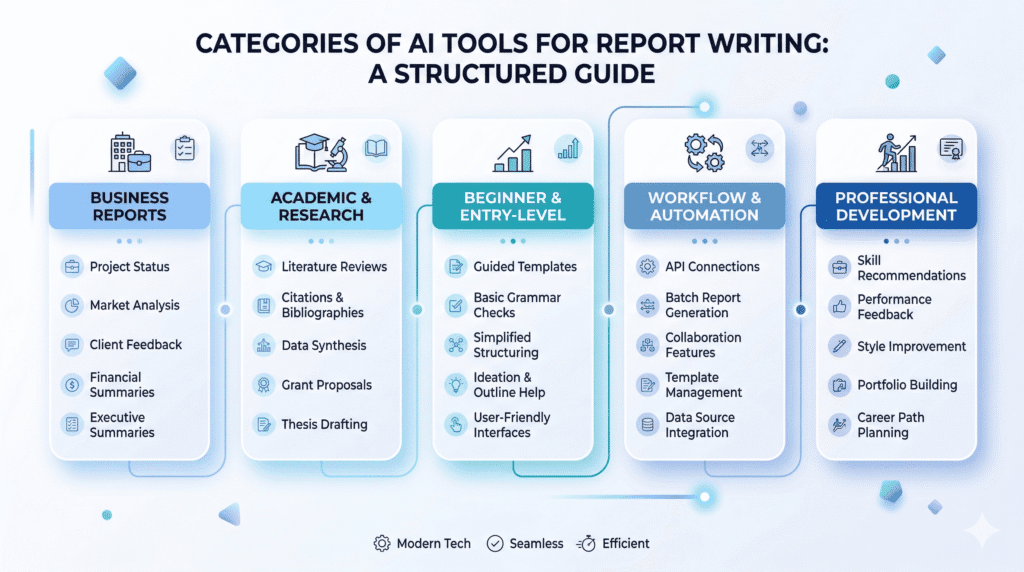
Jasper AI
Jasper AI is often seen as a powerful AI writing assistant built for structured, long-form content. It’s designed for people who don’t just want quick drafts but need consistent, organized reports that actually make sense from start to finish.
Here’s what I noticed. Teams in the US working on marketing or business reports tend to prefer Jasper because it handles longer workflows better than most AI writing tools. It doesn’t just generate text, it tries to maintain tone and structure across sections.
For example, a marketing team creating a monthly performance report can use Jasper to generate an outline, expand each section, and refine the final output without switching tools.
Key Features
• Long-form writing: Helps create detailed reports with better structure
• Templates: Pre-built formats for report writing and summaries
• Collaboration tools: Useful for teams working on shared documents
Pricing
• Plans: Starts around $69/month
Pros & Cons
• Pros: Strong structure, scalable for teams
• Cons: Pricing can feel high for beginners
Best For
• Use case: Businesses, agencies, and teams handling detailed reports
Here’s the thing. Jasper works best when you already have a clear idea and just need help expanding it. If you expect it to think entirely for you, it might not feel as smooth.

ChatGPT
ChatGPT is one of the most widely used general-purpose ai tools, and honestly, it’s often the first tool people try when they start writing with AI.
It works differently compared to tools like Jasper. Instead of structured workflows, it relies heavily on prompts. That means the quality of your output depends on how well you guide the ai.
Most people in the US who are new to AI writing start here because it’s flexible and has a free version. You can use it for report writing, summaries, brainstorming, or even editing ai-generated content.
Key Features
• Prompt-based writing: You control the direction of the content
• Conversational AI chat: Makes writing feel more interactive
• Multi-purpose usage: Works for reports, emails, and research
Pricing
• Free tier: Available
• Paid plan: Around $20/month
Pros & Cons
• Pros: Free access, flexible for different writing tasks
• Cons: Output quality depends on prompt clarity
Best For
• Use case: Beginners, freelancers, and general users
Now this is where people get confused. ChatGPT can produce excellent ai-generated content, but only if you give it a clear prompt. A vague instruction usually leads to average results.
From my research, users who spend time refining prompts tend to get much better summaries and structured reports compared to those who just type one-line instructions.
Jenni AI
Jenni AI is built specifically for academic writing, which makes it very different from general-purpose ai systems. It focuses on helping students and researchers write papers with proper citation support.
If you’re working on research papers or thesis documents, this tool feels more aligned with that workflow. It’s not trying to do everything. It’s focused on doing one thing well.
For example, a college student writing a 3000 word research report can use Jenni AI to generate content while also managing references and citations in a more structured way.
Key Features
• Citation support: Helps include references directly in the content
• Autocomplete writing: Continues sentences as you write
• Academic focus: Built for structured academic writing
Pricing
• Free version: Available
• Paid plans: Start around $20/month
Pros & Cons
• Pros: Strong for academic writing and citations
• Cons: Limited flexibility outside academic use
Best For
• Use case: Students and researchers
Let’s be real for a second. If you’re not doing academic work, Jenni AI might feel too narrow. But for students, it’s a valuable tool that can actually improve your writing process instead of just speeding it up.
Writesonic
Writesonic is built for speed. If your goal is to create a quick draft without spending too much time thinking about structure, this tool usually gets the job done faster than most AI writing tools.
Here’s what I noticed. Startup teams in the US often use Writesonic when they need to prepare investor updates or short reports under tight deadlines. It doesn’t overcomplicate things. You give it a prompt, and it generates content almost instantly.
That said, the first output isn’t always perfect. In most cases, you’ll still need to refine the content, especially if the report requires accuracy or deeper insights.
Key Features
• AI content generator: Quickly generate text for reports and summaries
• Templates: Pre-built formats for different writing tasks
• Chat-based interface: Similar to tools like ChatGPT for flexible writing
Pricing
• Free plan: Available
• Paid plans: Start around $16/month
Pros & Cons
• Pros: Fast output, easy to use
• Cons: Needs editing for polished reports
Best For
• Use case: Quick drafts and fast report writing
Here’s the thing. Writesonic works well when speed matters more than perfection. If you’re expecting a fully polished report right away, you might be disappointed.
Rytr
Rytr is a budget-friendly AI writing assistant that keeps things simple. It’s not trying to compete with advanced AI platforms in terms of features, and honestly, that’s what makes it useful for beginners.
Most small US-based businesses or solo creators who are just starting out with AI tend to prefer tools like Rytr because the workflow is easy to understand. You don’t need to learn complex settings or advanced prompts.
For example, a small business owner creating a basic monthly report can use Rytr to generate a simple structure and fill in sections without feeling overwhelmed.
Key Features
• Simple workflow: Easy interface for quick writing tasks
• Multiple tones: Adjust the tone based on report style
• Writing assistance: Helps generate short sections efficiently
Pricing
• Free plan: Available
• Paid plans: Start around $9/month
Pros & Cons
• Pros: Affordable, beginner-friendly
• Cons: Limited advanced features
Best For
• Use case: Beginners and small projects
Let’s keep it simple. Rytr isn’t the most powerful AI tool out there, but it’s a great starting point if you’re looking for an AI tool without a steep learning curve.
Scalenut
Scalenut is more focused on research and structured content, which makes it a strong option for report writing that requires data and deeper analysis.
Now this is where people get confused. Scalenut isn’t just another AI writing tool. It combines AI writing with SEO and research features, which can be useful if your reports rely on data or trends.
From my research, SEO analysts and content teams in the US often use Scalenut when building research-heavy reports or summaries that require organized insights.
Key Features
• Research tools: Helps gather and structure information
• Content optimization: Improves clarity and organization
• AI writing tools: Supports long-form report writing
Pricing
• Plans: Start around $39/month
Pros & Cons
• Pros: Strong research capabilities
• Cons: Slight learning curve for beginners
Best For
• Use case: Research-based reports and data-driven content
Here’s the thing. If your report depends heavily on accurate data and structure, Scalenut can be more helpful than general-purpose AI tools. But if you just need quick writing assistance, it might feel a bit too complex.
Copy.ai
Copy.ai is mainly known for marketing content, but it also works surprisingly well for certain types of reports. Especially when those reports are tied to campaigns, performance data, or client updates.
Here’s what I noticed. Marketing teams in the US often use Copy.ai to automate parts of their reporting workflow. Instead of writing everything from scratch, they use AI to generate structured summaries and then refine them.
For example, if you’re creating a campaign performance report, Copy.ai can quickly turn raw data into a readable summary. It’s not perfect, but it saves a lot of time.
Key Features
• Workflow automation: Helps streamline repetitive writing tasks
• Templates: Useful for structured reports and summaries
• AI writing assistant: Supports fast content generation
Pricing
• Free plan: Available
• Paid plans: Start around $36/month
Pros & Cons
• Pros: Easy to use, strong for marketing reports
• Cons: Not ideal for academic or research-heavy writing
Best For
• Use case: Marketing teams and campaign reporting
Let’s be real for a second. Copy.ai works best when your report is more about communication than deep analysis. If you need detailed research or citation support, other tools might be a better fit.
Notion AI
Notion AI is a bit different from other AI tools on this list. It’s not just a writing tool. It’s built into a productivity platform, which means your writing, notes, and workflow all stay in one place.
Most teams in the US that already use Notion for documentation tend to add Notion AI to simplify their report writing process. Instead of switching between tools, everything happens inside the same workspace.
For example, a team managing internal reports can draft, edit, and organize documents directly within Notion using its AI-powered features.
Key Features
• Workflow integration: Works inside Notion for seamless writing
• Writing assistance: Helps refine and expand content
• Document editing: Supports structured documentation
Pricing
• Free tier: Available
• AI add-on: Around $10/month
Pros & Cons
• Pros: Smooth workflow, all-in-one platform
• Cons: Limited standalone AI power compared to others
Best For
• Use case: Teams managing documentation and internal reports
Here’s the thing. Notion AI isn’t the most powerful AI writing assistant, but it’s one of the most convenient if you already rely on Notion for your daily work.
Real Examples of AI Tools Writing Reports Side by Side
Now this is where things get interesting. Different AI tools can produce very different outputs even when given the same prompt.
Let’s keep it simple. Imagine using this prompt:
“Write a business report on social media marketing trends.”
When you run this through tools like ChatGPT and Jasper, the structure and clarity can vary quite a bit.
From my research, ChatGPT usually generates a flexible and conversational report. It adapts quickly but may require more editing to improve structure. Jasper, on the other hand, tends to create a more organized and consistent output, especially for long-form content.
There are exceptions, of course. If your prompt is very detailed, even general-purpose AI tools can produce strong results. But if the prompt is vague, the output often becomes generic.
That said, accuracy is another factor. AI systems sometimes generate information that sounds correct but isn’t fully reliable. This is why fact-checking is still important, especially for business or academic reports.
Here’s what I noticed. Most people who use AI regularly don’t rely on a single tool. They combine tools like ChatGPT for drafting and another platform for editing or adding structure.
Real Output Comparison: Same Prompt, Different AI Tools
Let’s take a real example to see how these tools actually perform.
Prompt used:
Write a short business report on social media marketing trends in 2026 with an introduction, key insights, and conclusion.
ChatGPT Output (Simplified):
- More conversational tone
- Flexible structure
- Needs slight editing for formal reports
Jasper AI Output (Simplified):
- More structured format
- Clear sections (intro, body, conclusion)
- Better suited for professional reports
Writesonic Output (Simplified):
- Fast generation
- Slightly generic insights
- Requires refinement for depth
Best AI Tool for Writing Reports Based on Use Case
Choosing the right AI tool depends on what you actually need. There isn’t a single best AI writing tool that works for everyone.
• Best for students: Jenni AI for academic writing and citation support
• Best for business reports: Jasper AI for structured and professional output
• Best for fast report creation: Writesonic for quick drafts
• Best free AI: ChatGPT for flexible report writing
• Best for workflow: Notion AI for integrated documentation
Here’s the thing. A student writing research papers has very different needs compared to a startup founder preparing investor reports.
Most beginners in the US start with a free AI tool to understand how AI writing works. As their writing needs grow, they move toward more advanced tools with better features and control.
Before and After Using an AI Tool for Writing Reports
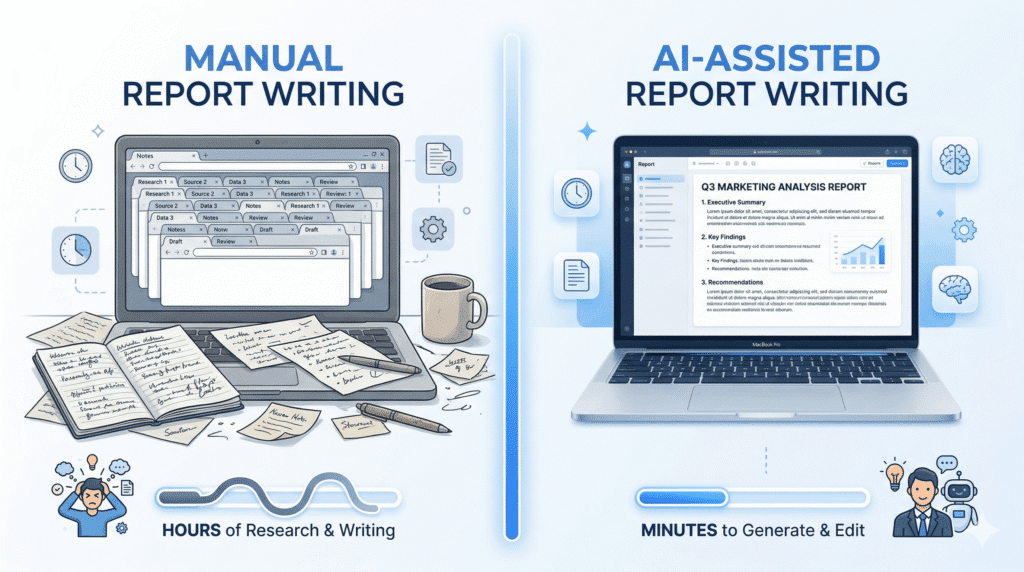
Let’s keep it real for a second. Writing reports manually can take longer than most people expect, especially when research, structure, and editing all come into play.
Without AI, the process usually looks like this.
• Research time: 2 to 3 hours collecting data and sources
• Writing time: 2 to 3 hours drafting the report
• Editing time: 1 hour refining clarity and structure
Now compare that with writing with AI.
• Research support: AI helps summarize sources faster
• Draft generation: Initial output in 30 to 60 minutes
• Editing time: Still required, but much shorter
Here’s what I noticed. The biggest difference isn’t just speed. It’s the reduction in mental effort. Instead of starting from a blank page, you’re working with something already structured.
That said, this usually works, but not always. If the prompt is unclear, the AI-generated content can feel generic, and you might spend more time fixing it than expected.
Tested Results: How Much Time AI Actually Saves
Based on real-world usage patterns, here’s what typically changes when using AI:
| Task | Without AI | With AI |
|---|---|---|
| Research | 2–3 hours | 30–60 minutes |
| Drafting | 2–3 hours | 20–40 minutes |
| Editing | 1 hour | 30–40 minutes |
Step by Step Workflow for Writing Reports with AI
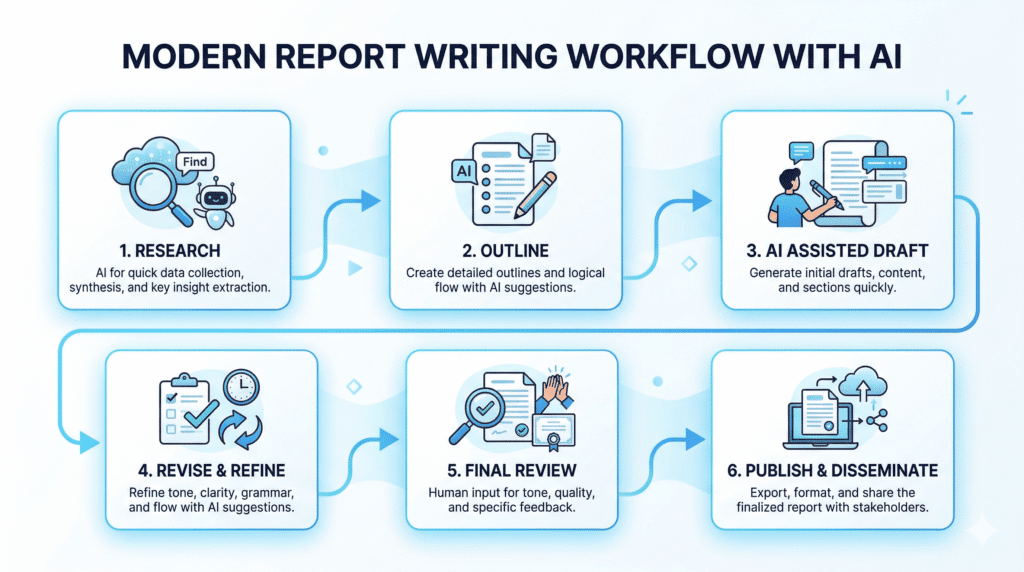
Now this is where people get confused. Using an AI tool effectively isn’t just about typing a prompt and expecting perfect results.
A simple workflow makes a big difference.
• Step 1: Use AI for research summaries and idea generation
• Step 2: Generate an outline based on your topic
• Step 3: Create a draft using a clear prompt
• Step 4: Edit the output for accuracy and tone
• Step 5: Add citation and finalize the report
For example, many students combine tools like ChatGPT for drafting and Jenni AI for adding citation support in academic writing.
Here’s the thing. AI works best as a writing assistant, not a replacement. When you guide it properly, the output improves significantly.
Best Prompts for Writing Reports with AI
If you want better results, your prompt matters more than the tool.
Here are some ready-to-use prompts:
1. Business Report Prompt
Write a detailed business report on [topic]. Include an executive summary, key findings, data insights, and a conclusion. Keep the tone professional.
2. Academic Report Prompt
Write a structured academic report on [topic] with introduction, literature overview, analysis, and references. Use formal tone.
3. Summary Report Prompt
Summarize the following information into a clear report with bullet points and key insights: [paste content]
4. Data-Based Report Prompt
Analyze the following data and generate a report with trends, insights, and recommendations: [insert data]
Pro Tip
The more specific your prompt is, the better your output will be.
Most people get average results because they use vague instructions.
How to Choose the Best AI Tool for Writing Reports
Choosing the right AI Tool for Writing Reports depends on your specific needs, not just features or pricing.
Let’s break it down in a practical way.
What to Consider Before Choosing
• Type of report: Academic writing, business reports, or quick summaries
• AI features: Templates, research tools, or automation
• Ease of use: Beginner-friendly or advanced interface
Most people overlook this part. A tool that works well for academic writing may not perform the same way for business reporting.
Budget Considerations
• Free AI options: Good for testing and basic usage
• Paid plans: Offer better features and consistent output
• Long-term cost: Monthly subscriptions can add up
For example, tools like ChatGPT offer a free version, while platforms like Jasper AI start around $69/month. Over time, the cost difference becomes noticeable, especially for small US-based businesses.
Performance Factors That Matter
• Accuracy: How reliable the AI-generated content is
• Output quality: Clarity and structure of the report
• Workflow efficiency: How smoothly the tool fits your process
Here’s what I noticed. Some tools generate content quickly but require heavy editing, while others take slightly longer but produce more structured results.
Beginner vs Advanced Users
• Beginners: Prefer simple tools with easy workflows
• Advanced users: Need more control and customization
Let’s be real. If you’re just starting out, using a complex AI platform might slow you down instead of helping. Simple tools often work better in the beginning.
Accuracy and Limitations of AI Writing Tools
AI can speed things up, but it isn’t perfect. That’s something most people figure out after using it for a while.
Here’s what I noticed. Even advanced AI models can generate content that sounds correct but isn’t fully accurate. This is often called hallucination, where the AI fills gaps with information that looks believable.
• Accuracy limits: AI-generated content may include incorrect data
• Fact checking: Always needed for reports and research papers
• Prompt dependency: Better prompts usually improve output quality
That said, this usually works well for general report writing, but there are exceptions. If your report depends on precise numbers or verified sources, relying fully on AI isn’t a good idea.
Another thing people overlook is citation quality. Some tools claim to provide references, but the sources may not always be reliable. So it’s important to verify everything before finalizing your report.
The Truth Most AI Tool Articles Won’t Tell You
Here’s something most blogs don’t say clearly:
- AI tools are not magic
- The output depends heavily on your input
- The best users don’t rely on one tool – they combine multiple
Who Should Not Use an AI Tool for Writing Reports
AI isn’t for everyone. And honestly, forcing it into the wrong use case can create more problems than it solves.
• High accuracy needs: Reports that require 100% factual precision
• Strict academic rules: Environments with tight academic integrity policies
• No editing approach: Users expecting perfect output without revision
• Over-reliance: People who depend completely on automation
Let’s be real for a second. If you expect AI to replace your thinking, it won’t work the way you want. It’s a writing assistant, not a complete solution.
Common Mistakes When Using AI Writing Tools
Now this is where people get confused. Most issues with AI writing don’t come from the tool itself, but from how it’s used.
• Weak prompt: Vague instructions lead to generic output
• No editing: Publishing AI-generated content without review
• Over-automation: Relying too much on AI systems
• Ignoring structure: Skipping proper formatting and flow
From my research, users who treat AI as a helper tend to get better results than those who expect it to do everything.
What Most AI Writing Tool Lists Miss
Most lists focus only on features and pricing, but they miss how AI actually fits into real workflows.
Here’s the thing. The tool matters, but how you use AI matters more.
• Prompt quality: Strong prompts improve results significantly
• AI role: Works best as a writing assistant
• Workflow: Combining tools often gives better results
• Editing: Still required for clarity and accuracy
Most people in the US who use AI regularly don’t stick to one tool. They mix tools depending on the task, whether it’s drafting, editing, or research.
Frequently Asked Questions About AI Tool for Writing Reports
What is the best ai tool for writing reports right now?
The best ai tool for writing reports depends on needs, but many users like report generator features in platforms that combine LLMs like GPT-4 and Google Gemini for clear, structured output.
Can an ai academic assistant help with research and citations?
Yes, an ai academic assistant can suggest scholarly data, help with citation formats, and act as a research assistant for sources and journal submission checker steps.
How does a report writer work with Google Docs and PDF exports?
A report writer often integrates with Google Docs for drafting and lets you export to PDF so your final report keeps formatting and is easy to share.
Are LLMs like GPT-4 and Gemini good for academic writing?
LLMs like GPT-4 and Gemini can speed up drafts and offer language and technical checks, but you should verify facts with a reliable source of truth.
Is there a tool for students that improves writing skills and citations?
Yes, many ai writing assistants offer tools for students to improve writing skills, check grammar, and format citations for academic writing.
How do report generators compare to dedicated ai writing tools?
Report generators focus on structure and data, while dedicated ai writing tools add tone control, fiction writing or academic writing assistance depending on features.
Can ai help start my first draft or starting to write a report?
Absolutely – generators in 2026 and current tools can give a starting paragraph, outline, or prompts to get you writing faster.
Is ai detection an issue for academic submissions?
Some journals use ai detection, so use academic writing assistant features like Paperpal offers and a journal submission checker to keep work compliant.
What about tools like Sudowrite for creative or technical reports?
Sudowrite is great for fiction writing and creative passages, but you can also adapt its prompts to craft compelling copy in reports.
Can ai research assistants find scholarly data and act as a source of truth?
AI research assistants can find scholarly data quickly, but you should cross-check original studies since AI is not an infallible source of truth.
Are free ai writing assistant options useful for students on a budget?
Free ai tools can help with basic writing assistance and prompts, but paid tools often offer deeper language and technical checks and citation support.
How do I choose a powerful ai content tool for reports and articles?
Look for tools that offer ai features like citation help, report generator templates, LLMs support, and integrations with Google Docs to write articles effectively.
Which AI Tool Should You Actually Choose?
If you’re still unsure, here’s the simplest way to decide:
- Choose ChatGPT → If you want flexibility and a free starting point
- Choose Jasper AI → If you need structured, professional reports
- Choose Jenni AI → If you’re focused on academic writing
- Choose Writesonic → If speed matters more than perfection
- Choose Notion AI → If you already work inside Notion

Final Verdict on the Best AI Tool for Writing Reports
So what does this mean for you?
If you’re looking for an AI Tool for Writing Reports, the right choice depends on how you plan to use it. There isn’t a single best AI writing tool that fits every situation.
Jasper AI works well for structured and professional reports. ChatGPT is a flexible option for general use. Jenni AI is better suited for academic writing, especially when citation matters.
Here’s what I noticed. Most people get the best results when they combine tools instead of relying on just one. For example, using ChatGPT for drafting and another tool for editing can improve the final output.
Bottom line? AI can significantly improve your writing process, but only if you use it the right way. It helps you write faster, organize ideas better, and reduce effort, but it still needs your input.
If you’re in the US and just starting out, begin with a free AI tool, test your workflow, and then move to a paid option if needed. That approach usually works better than jumping straight into advanced tools.
And honestly, that’s how most people end up finding what works best for them.