
Ever feel like you’re constantly racing against the clock to churn out content? Whether it’s blog posts, social media updates, or product descriptions, the demand for fresh, engaging text never seems to slow down. This constant pressure can become a major workflow bottleneck for small businesses, marketers, and even individual creators, often leading to burnout or missed opportunities.
That’s where AI writing tools step in. If you’ve been wondering what is Writesonic and how it fits into your content strategy, you’re in the right place. This guide will explain Writesonic’s core functions, key features, and practical use cases in simple terms, helping you understand if this AI writing assistant can truly boost your productivity.
What Is Writesonic? A 60-Second Overview
At its core, Writesonic is an artificial intelligence tool designed to help you generate various types of written content quickly and efficiently. Think of it as a powerful AI content generator that uses advanced language models, like the underlying GPT-4 technology, to produce human-like text. Whether you need a catchy ad copy, a detailed blog post, or engaging social media updates, Writesonic aims to streamline your content creation process by doing much of the heavy lifting for you. It’s an AI writing tool built to turn your ideas into polished text with remarkable speed.
The Core Idea: Your AI Writing Partner
The fundamental concept behind Writesonic is to act as your digital writing partner, not a replacement. It’s an AI writing assistant that takes your initial thoughts, keywords, or brief descriptions and expands them into full-fledged articles, marketing copy, or other text formats. This partnership means you provide the direction, and the AI handles the word-smithing, helping you overcome writer’s block and significantly speed up your content generation. The goal isn’t just to produce text, but to create high quality content that resonates with your audience and meets specific objectives, like improving your SEO.
Who Is Writesonic Built For? (Bloggers, Marketers, Students, etc.)
Writesonic is a versatile platform, making it useful for a wide range of individuals and businesses struggling with content demands.
- Bloggers and Content Creators: If you need to generate blog posts, article outlines, or even full drafts quickly, Writesonic can be a game-changer. It helps with brainstorming ideas and getting initial text down fast.
- Digital Marketers: For those running digital marketing campaigns, Writesonic is excellent for creating ad copy, landing page copy, email subject lines, and social media posts. It helps generate high-converting copy that captures attention.
- Ecommerce Businesses: Writing unique product descriptions for hundreds of items can be tedious. Writesonic can act as a product description generator, saving hours of manual work.
- Agencies: Managing content for multiple clients means constant demand. This AI writing tool helps agencies scale their content creation process without hiring more copywriters.
- Students and Researchers: While not for academic writing itself, it can assist with summarizing notes, generating ideas for essays, or even rephrasing complex texts for better understanding.
- Small Business Owners: If you’re wearing many hats, Writesonic can help you create website copy, marketing materials, and even internal communications without needing a dedicated copywriter.
Essentially, anyone who regularly needs to produce written content and wants to do it faster and more efficiently can benefit from this AI content generator.
How Does It Actually Work? (Input a prompt, get AI-generated content)
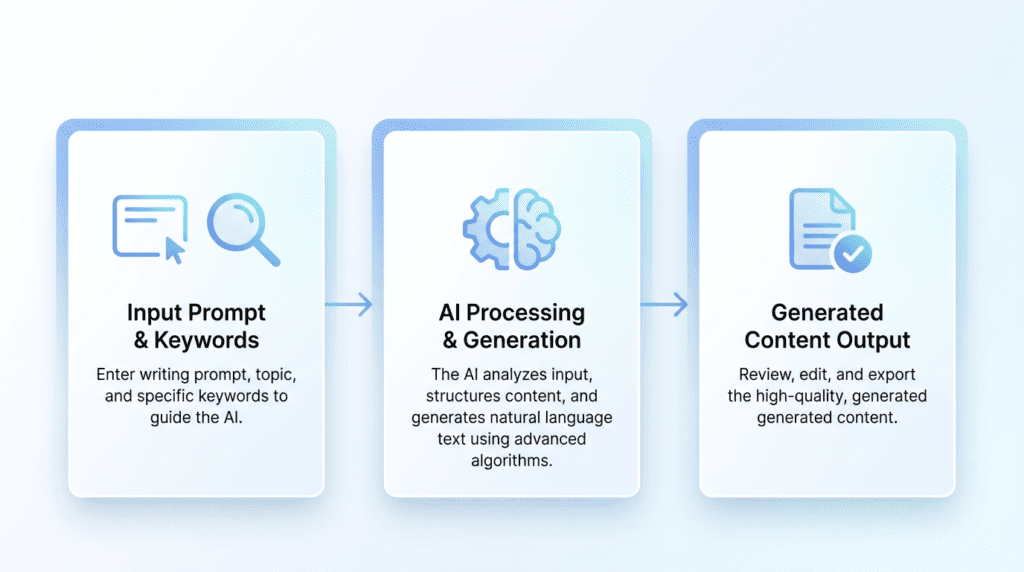
The process of using Writesonic is surprisingly straightforward, even for beginners. You typically start by choosing from a wide array of templates designed for specific content types, like a “Blog Post Intro” or “Facebook Ad Copy.” Once you select a template, you’ll provide a brief input, often called a “prompt.” This prompt usually includes:
- A short description of what you want to write about.
- Key keywords you want the AI to include.
- **Your desired tone
How Writesonic Can Transform Your Writing Process
Moving beyond simply understanding “what is Writesonic,” let’s explore the tangible ways this AI writing tool can fundamentally change how you approach content creation. It’s not just about automating tasks; it’s about overcoming common hurdles and unlocking new levels of efficiency and quality in your workflow.
Overcoming Writer’s Block with AI-Generated Ideas
One of the most frustrating challenges for any content creator is staring at a blank page, unsure where to begin. Writer’s block can derail deadlines and stifle creativity. Writesonic acts as a powerful brainstorming partner, providing instant inspiration when your own ideas run dry. Instead of struggling for hours, you can input a basic topic or a few keywords, and the AI will generate a range of potential blog post titles, article outlines, social media captions, or even entire content clusters.
This capability is particularly beneficial for beginners who might not yet have a robust system for idea generation, or for experienced marketers facing pressure to produce fresh content constantly. It doesn’t just give you a single idea; it offers variations, different angles, and unexpected perspectives, allowing you to pick the best starting point or combine elements for a truly unique approach. The practical implication is a significant reduction in the time spent on the initial ideation phase, freeing you up to focus on refining and personalizing the AI’s suggestions.
Accelerating Content Creation from Hours to Minutes
The most immediate and impactful benefit of using an AI writing tool like Writesonic is the sheer speed at which it can produce content. What once took hours of research, drafting, and structuring can now be accomplished in a fraction of the time. This acceleration isn’t about replacing human writers entirely, but rather about supercharging their productivity.
For businesses and content creators operating in fast-paced digital environments, this speed is a game-changer. Imagine needing to publish multiple blog posts a week, create daily social media updates, or launch a new email marketing campaign with tight deadlines. Manually generating all that content can quickly lead to burnout and missed opportunities. Writesonic allows you to generate initial drafts for articles, ad copy, product descriptions, and more, often within minutes. This means you can scale your content output without necessarily scaling your team or budget at the same rate.
For example, an affiliate marketer might need to write reviews for several new products. Instead of spending an hour on each, Writesonic can generate a comprehensive first draft in 5-10 minutes, covering key features and benefits. The marketer then spends their time refining, adding personal insights, and optimizing for SEO, rather than struggling with the initial blank page. This workflow shift means more content can be published, tested, and iterated upon, leading to faster results and a more agile content strategy. The long-term consequence of this accelerated workflow is the ability to maintain a consistent online presence, respond quickly to market trends, and ultimately, grow your digital footprint more effectively.
Improving Content Quality and Consistency
Beyond speed, Writesonic also contributes to higher quality and more consistent content. The AI is trained on vast datasets of text, meaning it can generate grammatically correct, well-structured, and coherent prose. For those who struggle with grammar, sentence structure, or maintaining a professional tone, Writesonic acts as an intelligent assistant, ensuring a baseline level of quality.
Furthermore, for businesses with multiple content creators or a need to maintain a specific brand voice, Writesonic can help ensure consistency. While not a perfect solution on its own, it can be guided to produce content that aligns with established guidelines, reducing variations in tone and style that can occur across different writers. This consistency helps build a stronger, more recognizable brand identity over time.
Repurposing Existing Content for Different Platforms
In today’s multi-channel digital landscape, getting the most out of every piece of content is crucial. Writesonic makes content repurposing significantly easier. A single long-form blog post, for instance, can be transformed into a series of social media updates, an email newsletter snippet, a video script outline, or even a concise summary for a different audience.
Instead of manually rewriting and reformatting content for each platform, you can feed your existing article into Writesonic and prompt it to generate variations suitable for Twitter, LinkedIn, Instagram captions, or even short ad copy. This maximizes the return on investment for your original content, extends its reach, and ensures your message resonates across all your digital touchpoints without requiring extensive manual effort.
Exploring Writesonic’s Key Features and Tools
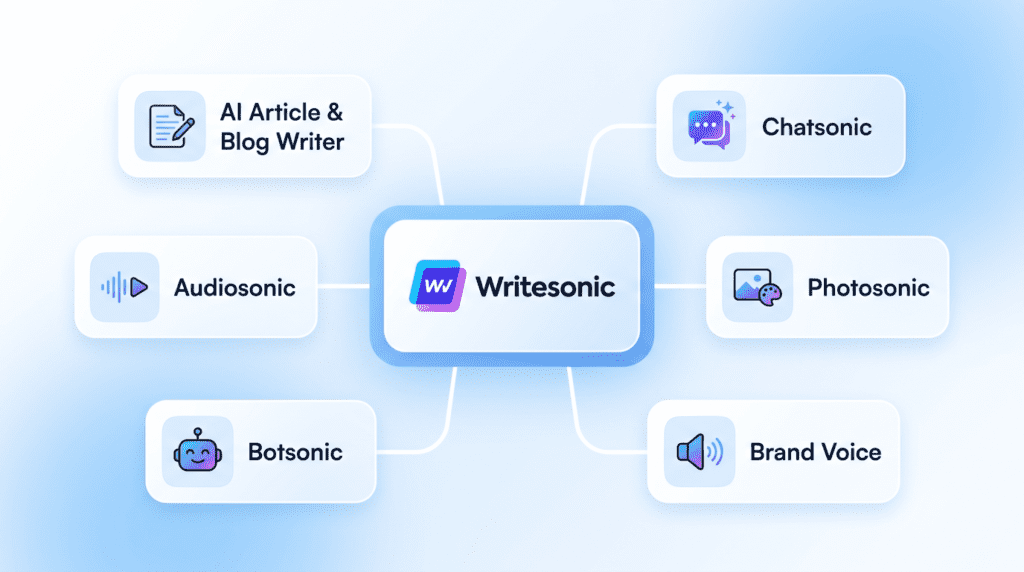
To truly understand “what is Writesonic” and its capabilities, it’s essential to look at the specific tools and features it offers. The platform isn’t just a single AI writer; it’s a suite of specialized generators designed to tackle various content needs.
AI Article & Blog Writer: From Idea to Full Post
The AI Article & Blog Writer is often the flagship feature that draws many users to Writesonic. It’s designed to take you from a basic concept to a complete, long-form article draft with remarkable speed. Unlike simpler tools that only generate paragraphs, this feature aims to produce structured content, complete with introductions, body paragraphs, and conclusions.
The process typically starts with you providing a topic or keyword. Writesonic then helps you generate potential titles and outlines. Once an outline is selected or customized, the AI can then write each section, building out the full article. This is incredibly valuable for bloggers, SEO specialists, and content marketers who need to produce a high volume of articles for their websites. For example, if you’re an SEO affiliate blogger targeting the “What Is Writesonic” keyword, you could input that, generate an outline covering its features and benefits, and then have the AI draft the content for each section. While the output always requires human review, editing, and fact-checking, it provides a robust foundation, saving countless hours compared to writing from scratch. What beginners often struggle with is making the AI output sound truly human and unique; this requires learning how to refine prompts and effectively edit the generated text. However, with practice, users find that the AI becomes an indispensable assistant for generating high-quality, SEO-optimized content drafts.
Chatsonic: A Conversational AI Alternative to ChatGPT
Chatsonic is Writesonic’s answer to conversational AI, offering a chat interface similar to popular AI chatbots like ChatGPT. However, Chatsonic often distinguishes itself by providing real-time information access, meaning it can pull data from the internet to answer questions about current events or recent developments, a capability not always present in other models.
This tool is incredibly versatile for quick research, brainstorming, and generating short-form content. Need a quick list of blog post ideas about “What Is Writesonic”? Ask Chatsonic. Want to summarize a complex topic? Chatsonic can do it. It can also generate images directly within the chat interface, making it a powerful tool for visual content brainstorming alongside text. For a digital marketer, Chatsonic can quickly draft social media captions, email subject lines, or even help refine ad copy variations on the fly.
Photosonic: Creating Unique, AI-Generated Images
Visual content is non-negotiable in today’s digital world. Photosonic is Writesonic’s AI image generator, allowing users to create unique images from text descriptions. Instead of relying solely on stock photo libraries, which can sometimes feel generic, Photosonic enables you to describe the exact image you need, and the AI will attempt to generate it.
This feature is a boon for bloggers, social media managers, and website owners looking for custom visuals without the cost or time commitment of hiring a graphic designer or photographer. While AI-generated images can sometimes be imperfect, the ability to rapidly produce multiple variations and iterate on prompts means you can often find a suitable, unique visual to accompany your content, enhancing engagement and brand identity.
Brand Voice: Training the AI to Write Like You
One of the common criticisms of AI-generated content is its potential to sound generic or lack a distinct brand personality. Writesonic addresses this with its Brand Voice feature. This tool allows you to “train” the AI by feeding it examples of your existing content – blog posts, website copy, emails – that embody your brand’s unique tone, style, and vocabulary.
Once trained, the AI will attempt to generate new content that adheres to your established brand voice. This is a crucial feature for businesses aiming for consistent messaging across all their communications. It helps ensure that whether you’re generating a new product description or a social media update, the output sounds like *your* brand, not just a generic AI. This becomes particularly valuable as a business scales and needs to maintain a unified voice across a larger volume of content.
Botsonic: Building Your Own Custom AI Chatbot
Botsonic takes AI automation a step further by allowing users to create their own custom AI chatbots. Unlike Chatsonic, which is a general-purpose conversational AI, Botsonic lets you build a chatbot specifically trained on your own data – your website content, FAQs, product documentation, or knowledge base.
These custom chatbots can be deployed on your website to handle customer service inquiries, provide instant support, guide users through product features, or even qualify leads. For SaaS companies, this means automating support for common questions, freeing up human agents for more complex issues. For e-commerce stores, it can provide 24/7 product information and assistance. It’s a powerful tool for enhancing user experience and streamlining operational efficiency.
Audiosonic: Converting Your Text Content into Voiceovers
Audiosonic is Writesonic’s text-to-speech tool, designed to convert written content into natural-sounding voiceovers. This feature opens up new avenues for content repurposing and accessibility. You can take your blog posts, articles, or marketing copy and transform them into audio versions.
This is particularly useful for creating podcasts, voiceovers for video content, or making your written content accessible to a wider audience, including those who prefer listening or have visual impairments. It allows content creators to diversify their content formats without the need for expensive recording equipment or professional voice actors, making it easier to reach audiences on platforms like YouTube, Spotify, or even within e-learning modules.
What Types of Content Can You Create with Writesonic? (With Examples)
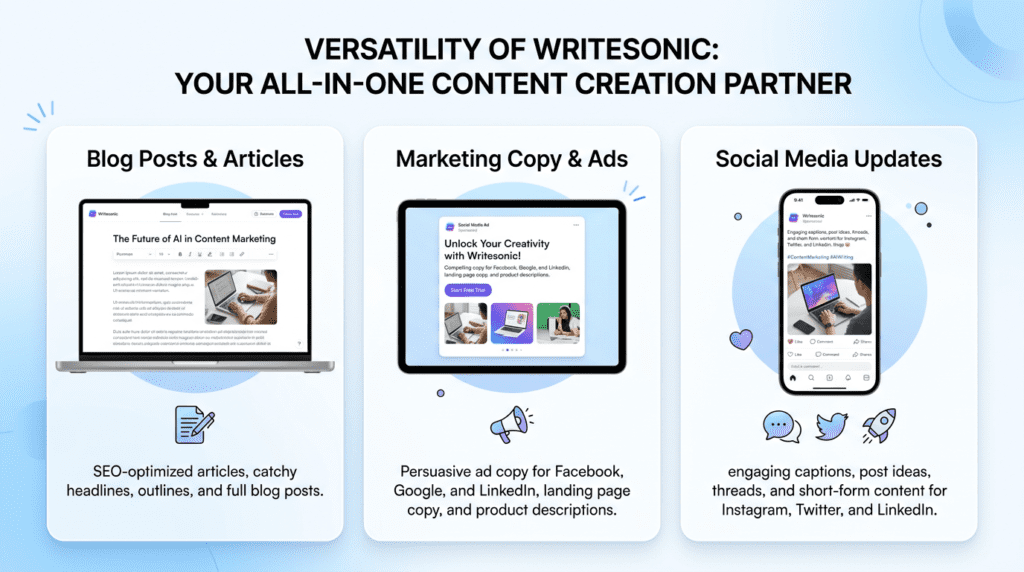
Understanding “what is Writesonic” also means grasping the sheer breadth of content types it can generate. The platform is designed to be a versatile content creation assistant, catering to a wide array of digital marketing and business needs.
For Bloggers: Generating SEO-Optimized Articles and Outlines
For bloggers, whether they’re just starting out or managing a well-established site, Writesonic is an invaluable tool for generating SEO-optimized articles and outlines. The platform can help with every stage of the blogging process, from initial ideation to drafting full posts.
When you’re trying to rank for specific keywords like “What Is Writesonic,” the AI can assist in crafting titles and meta descriptions that are not only compelling but also include your target keywords naturally. It can generate detailed outlines, ensuring your article covers all the essential subtopics and provides comprehensive value to the reader, which is crucial for search engine rankings. For instance, a blogger focusing on AI tools could use Writesonic to generate an outline for an article comparing different AI writing assistants, ensuring all key comparison points are covered. Then, the AI can help draft sections of the article, incorporating relevant keywords and maintaining a logical flow. This significantly reduces the time spent on the initial research and structuring phases, allowing the blogger to focus on adding unique insights, personal anecdotes, and further optimizing the content for their specific audience and SEO goals. The result is more consistent content publication, better search engine visibility, and a stronger online presence.
For Marketers: Crafting High-Converting Landing Page Copy and Ads
Digital marketers constantly need fresh, compelling copy to drive conversions. Writesonic excels at generating high-converting landing page copy and various forms of ad copy. This includes headlines, subheadings, calls to action (CTAs), and body text designed to persuade visitors.
For a marketer running a Google Ads campaign, Writesonic can generate multiple variations of ad headlines and descriptions, allowing for A/B testing to find the most effective messaging. Similarly, for a new product launch, it can craft compelling landing page copy that highlights benefits, addresses pain points, and encourages sign-ups or purchases. This helps marketers iterate quickly, test different angles, and optimize their campaigns for better performance without spending hours on copywriting.
For Social Media Managers: Writing Engaging Posts and Tweets
Maintaining an active and engaging presence across multiple social media platforms can be a full-time job. Writesonic simplifies this by helping social media managers generate a steady stream of creative and platform-specific content.
Whether it’s crafting concise and catchy tweets, designing engaging Instagram captions with relevant hashtags, or writing professional LinkedIn updates, Writesonic offers templates and tools tailored for each platform. For example, a social media manager promoting a new blog post about “What Is Writesonic” could use the tool to generate several different tweets, each with a unique hook and relevant hashtags, ensuring maximum reach and engagement. This helps maintain a consistent posting schedule and keeps the audience engaged without the constant pressure of coming up with new ideas from scratch.
For Students & Academics: Paraphrasing and Summarizing Complex Texts
While Writesonic is primarily a content creation tool, it also offers features that can be beneficial for students and academics. Its ability to paraphrase and summarize complex texts can be a valuable study aid.
Students can input dense academic articles or research papers and ask Writesonic to summarize the key points or paraphrase sections to aid in understanding. This can help in quickly grasping core concepts, preparing for presentations, or extracting essential information for essays. However, it’s crucial for students to use such tools ethically, ensuring that any AI-generated content is thoroughly reviewed, understood, and properly cited, and that it only serves as an aid rather than a replacement for original thought and writing.
Writesonic Pricing: How Much Does It Cost?
Understanding the cost of an AI writing tool like Writesonic is crucial for any business or individual looking to integrate it into their workflow. While the promise of AI-generated content is appealing, the practical reality often comes down to budget. Writesonic offers a tiered pricing structure designed to accommodate different user needs, from casual users to large agencies. It’s not just about a monthly fee; it’s about understanding the credit system and what kind of “words” you’re actually paying for.
The Free Plan: What Are the Limitations?
Writesonic does offer a free plan, which is a great way for beginners to get a feel for the platform without any financial commitment. This plan typically provides a limited number of “premium” words each month, often around 10,000 words. These premium words usually leverage Writesonic’s highest quality AI models, like GPT-4, offering superior output.
However, the free plan comes with clear limitations. You’ll likely find restrictions on the number of AI templates you can access, the length of content you can generate in a single go, and the advanced features like Brand Voice or Botsonic are usually locked away. For someone just needing to generate a few social media captions or short product descriptions, it might suffice. But if you’re aiming to write full blog posts or need consistent, high-quality output for a business, you’ll quickly hit its ceiling. It’s essentially a robust trial, not a long-term solution for serious content creators.
Understanding the “Word Count” Credit System (Standard vs. Premium)
Writesonic’s pricing model revolves around a “word count” credit system, but it’s not as straightforward as just counting words. The platform often differentiates between “Premium” quality words and “Good” quality words. Premium words are generated using Writesonic’s most advanced AI models (often GPT-4), providing higher accuracy, better coherence, and more human-like text. Good quality words, while still useful, might come from slightly older or less sophisticated models (like GPT-3.5) and may require more editing.
The key takeaway here is that your subscription plan dictates how many of each type of word you get. For example, a plan might offer 100,000 “Premium” words, or it might offer 200,000 “Good” words for the same price. This distinction is vital because the quality of the AI output directly impacts how much editing you’ll need to do. If you’re aiming for content that’s nearly publish-ready, you’ll want to prioritize plans with more Premium words. Overestimating the utility of “Good” words can lead to frustration and wasted time on heavy revisions.
When Does a Paid Plan Become Necessary?
A paid Writesonic plan becomes a necessity when your content needs move beyond basic experimentation or occasional use. If you’re consistently hitting the word limit on the free plan, or if you find yourself needing access to specific tools like the AI Article Writer for long-form content, Brand Voice for consistent tone, or Chatsonic for more dynamic interactions, it’s time to upgrade.
For bloggers aiming to publish multiple articles per month, marketers needing to generate a high volume of ad copy and landing page text, or small businesses looking to automate product descriptions, a paid plan offers the scale and features required. It’s also essential if you’re relying on Writesonic for SEO content, as the quality of “Premium” words is generally better suited for search engine optimization and reader engagement. Essentially, if content creation is a core part of your business or personal brand, the investment in a paid plan will likely pay off in terms of time saved and output quality.
Is Writesonic Good Value for the Price?
Assessing Writesonic’s value for money depends heavily on your specific use case and how effectively you integrate it into your workflow. For individuals or small teams that can leverage its full suite of features – from blog post generation to ad copy and even AI image creation – the platform can offer significant value. Plans typically start around $16–$19 per month for a decent number of premium words, scaling up for higher usage and more advanced features.
Compared to hiring a human copywriter for every piece of content, Writesonic can be incredibly cost-effective, especially for generating initial drafts, brainstorming ideas, or creating high volumes of short-form content. However, it’s not a magic bullet. The “value” isn’t just in the raw word count but in the *quality* of those words and the *time saved* on editing. If you find yourself spending more time correcting AI-generated text than it would take to write it yourself, then the value diminishes. For those who understand its limitations and are prepared to guide and refine its output, Writesonic can be an excellent investment in boosting content creation efficiency.
Reality Check: The Pros and Cons of Using Writesonic
Like any powerful tool, Writesonic comes with its own set of advantages and disadvantages. It’s important for users to approach AI writing with realistic expectations, understanding where it excels and where human intervention remains indispensable. Over-relying on AI without understanding its nuances can lead to generic content or, worse, factual inaccuracies.
The Upside: Speed, Versatility, and Idea Generation
Writesonic truly shines in its ability to generate content with incredible speed. What might take a human writer hours to draft, Writesonic can produce in minutes. This speed is a game-changer for content marketers on tight deadlines, bloggers looking to scale their output, or small business owners juggling multiple tasks. Its versatility is another major pro; with a vast library of templates, it can generate everything from blog post outlines and full articles to social media captions, ad copy, product descriptions, and even email subject lines. This means you don’t need multiple tools for different content types.
Perhaps one of its most underrated benefits is its power as an idea generator. When you’re staring at a blank page, struggling with writer’s block, Writesonic can quickly provide multiple angles, headlines, and content structures. This isn’t just about generating text; it’s about kickstarting creativity and overcoming the initial hurdle of starting a new piece of content. For many users, this alone justifies the investment, as it helps maintain momentum in their content creation process.
The Downside: The Need for Fact-Checking and Human Editing
While Writesonic is powerful, it’s crucial to understand its limitations. The biggest downside is the absolute necessity for human fact-checking and editing. AI models, even advanced ones like GPT-4, can “hallucinate” – meaning they can generate information that sounds plausible but is entirely false or outdated. This is particularly dangerous for factual content, news, or anything requiring accuracy. Relying solely on AI output without verification can damage your credibility.
Furthermore, AI-generated content, especially from lower-quality models, can sometimes lack a unique voice, genuine emotion, or deep insight. It might be grammatically correct and coherent, but it can feel generic or repetitive. Human editors are essential to infuse personality, refine the tone, ensure brand consistency, and add the nuanced understanding that only a human can provide. What starts as a time-saver can quickly become a time sink if you have to heavily rewrite or fact-check every sentence. Beginners often underestimate the amount of editing still required, leading to frustration.
The Learning Curve: How Easy Is It for a Beginner to Start?
For a beginner, Writesonic generally offers a relatively gentle learning curve, especially for its core features. The user interface is designed to be intuitive, with clear categories for different content types and straightforward input fields for prompts. Most users can jump in and start generating basic content like headlines or short paragraphs within minutes. The template-driven approach simplifies the process, guiding users through the necessary inputs.
However, mastering Writesonic to consistently produce high-quality, relevant output does require some practice. Understanding how to craft effective prompts, knowing which templates work best for specific tasks, and learning to refine the AI’s output are skills that develop over time. Beginners might initially struggle with getting the AI to produce exactly what they envision, often due to vague or insufficient prompts. The “long-form editor” can also be a bit more complex to navigate for new users compared to simpler tools. While the initial barrier to entry is low, unlocking its full potential requires a commitment to learning and experimentation.
How Does Writesonic Compare to Other AI Writers?
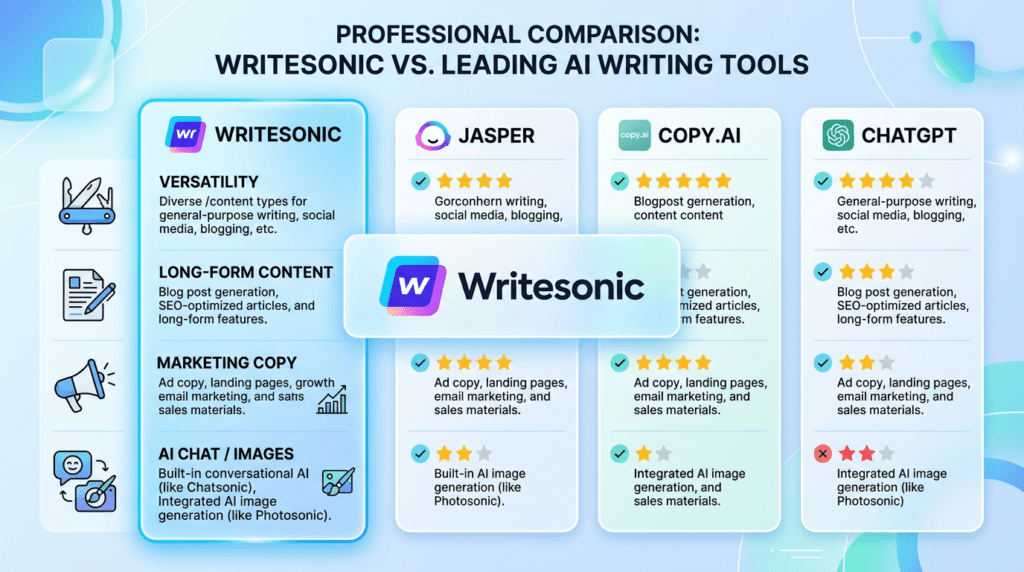
The AI writing landscape is crowded, with many tools vying for attention. While Writesonic is a strong contender, understanding its position relative to competitors helps users make an informed decision. It’s not about one tool being universally “better,” but rather which tool aligns best with specific needs and workflows.
Writesonic vs. Jasper: A Quick Look at the Key Differences
Writesonic and Jasper are two of the most prominent AI writing assistants, often compared directly. Jasper (formerly Jarvis) is widely regarded for its robust long-form content generation capabilities, particularly for blog posts and articles. Its “Boss Mode” and “Surfer SEO integration” are popular features for content creators focused on SEO-optimized, in-depth pieces. Jasper often feels more geared towards professional content teams and agencies that require extensive control over output and a more structured workflow for longer projects.
Writesonic, on the other hand, often stands out for its versatility across a broader range of content types, including its unique offerings like Photosonic (AI image generation) and Chatsonic (AI chatbot). While it also handles long-form content well, its strength lies in its comprehensive suite of tools for various marketing and content needs, making it a strong all-rounder. Writesonic’s pricing can sometimes be more flexible for smaller users, offering more granular control over word counts. If your primary need is high-volume, long-form SEO content, Jasper might have a slight edge. If you need a Swiss Army knife for diverse content generation, including images and chat, Writesonic is a compelling choice.
Writesonic vs. Copy.ai: Which is Better for Marketing Copy?
When it comes to marketing copy, both Writesonic and Copy.ai are strong contenders, but they often have subtle differences in their approach and strengths. Copy.ai built its reputation specifically on generating high-converting marketing copy, including ad copy, sales emails, and website content. Its interface is often praised for being extremely user-friendly, with a focus on quick generation of multiple copy variations, making it excellent for A/B testing. Many users find Copy.ai’s short-form marketing templates to be exceptionally effective and efficient.
Writesonic also offers a wide array of marketing copy templates and performs very well in this area. Its strength here often comes from its integration with other features, allowing users to generate marketing copy alongside other content types within the same platform. For example, you could generate a product description, then immediately create social media posts and ad copy for it. While Copy.ai might feel slightly more specialized and streamlined for pure marketing copy generation, Writesonic offers a more integrated content creation experience. If marketing copy is your *sole* focus and you need rapid iteration, Copy.ai could be marginally better. If you need marketing copy as part of a broader content strategy that includes blog posts, images, and more, Writesonic provides a more holistic solution.
Writesonic vs. ChatGPT: When to Use Each Tool
The comparison between Writesonic and ChatGPT is a common one, but they serve fundamentally different purposes, despite both being AI language models. ChatGPT, developed by OpenAI, is a general-purpose conversational AI. Its primary strength lies in its ability to understand and respond to natural language prompts in a conversational manner, making it excellent for brainstorming, asking questions, summarizing information, generating code, and engaging in open-ended dialogue. It’s a fantastic tool for exploration and general knowledge tasks.
Writesonic, on the other hand, is a specialized AI writing *tool* built on top of models like GPT-3.5 and GPT-4. While it uses similar underlying technology, Writesonic is engineered with specific content creation templates and workflows. It’s designed to produce structured, optimized content for specific use cases like blog posts, ad copy, product descriptions, and SEO meta descriptions. You’re not just chatting with an AI; you’re using a tool to generate specific *types* of content efficiently.
You’d use ChatGPT for research, idea generation, quick explanations, or debugging code. You’d use Writesonic when you need to generate a specific piece of marketing copy, a blog article draft, or a social media post, leveraging its tailored templates and features for a more polished, ready-to-use output. Writesonic’s Chatsonic feature is its direct answer to ChatGPT, aiming to provide a similar conversational experience but often with more up-to-date information and specific integrations. In short, ChatGPT is a powerful general-purpose AI assistant, while Writesonic is a specialized content creation platform.
Final Verdict: Is Writesonic the Right Tool For You?

Who Should Use Writesonic? (The Ideal User Profile)
Writesonic is an excellent fit for content creators, marketers, small business owners, and entrepreneurs who need to generate high-quality content quickly and efficiently. If your goal is to overcome writer’s block, scale your content production, or create diverse marketing copy, blog posts, and product descriptions without starting from scratch, Writesonic offers significant value. It particularly shines for those who appreciate a wide array of templates and are comfortable with an AI assistant handling initial drafts, understanding that human oversight is crucial for refinement and brand alignment. Its ease of use, as discussed earlier, makes it accessible even for beginners looking to leverage AI in their content strategy.
Who Might Be Better Off with an Alternative?
Conversely, Writesonic might not be the primary tool for users who require highly specialized, deeply researched, or extremely creative long-form content that demands minimal human intervention. If your workflow necessitates absolute factual accuracy without any manual verification, or if you’re looking for a conversational AI primarily for open-ended ideation rather than structured content generation (as explored in the Writesonic vs. ChatGPT comparison), you might find other tools more aligned with your specific needs. Additionally, users with very tight budgets who only require occasional, basic content might find the free plan’s limitations restrictive and the paid plans more comprehensive than necessary for their infrequent use.
The Bottom Line: A Powerful Assistant, Not a Replacement for a Writer
Ultimately, Writesonic stands out as a powerful content creation assistant. It excels at boosting productivity, providing creative inspiration, and generating initial drafts across a multitude of formats. However, it’s crucial to view it as an augmentation tool rather than a complete replacement for human writers. The insights from the “Reality Check” section highlight the ongoing need for human editing, fact-checking, and infusing a unique brand voice to ensure the final output is polished, accurate, and truly resonates with your audience. When used strategically, Writesonic empowers users to produce more content, faster, while maintaining quality through human refinement.
Frequently Asked Questions (FAQs)
Can Google detect content written by Writesonic?
Google’s algorithms are sophisticated and focus on the quality, relevance, and helpfulness of content, not specifically the tool used for its creation. AI-generated content that is unedited, repetitive, or lacks depth can be flagged for low quality, regardless of the generation method; human editing and optimization are key to ranking well.
Is the content generated by Writesonic plagiarism-free?
Writesonic aims to produce original content, but as with any AI model trained on vast datasets, it’s always advisable to run generated text through a plagiarism checker as a best practice to ensure uniqueness and avoid accidental similarities.
What is the difference between Chatsonic and ChatGPT?
As briefly touched upon in the comparison section, Chatsonic, integrated within Writesonic, offers real-time data access and the ability to generate images, making it more current and versatile for specific content creation tasks compared to ChatGPT’s general knowledge base (which, depending on the version, may have a knowledge cut-off).
Can I use Writesonic to write in different languages?
Yes, Writesonic supports content generation in multiple languages, offering various language options to cater to diverse global content strategies.
How do I get started with Writesonic’s free trial?
You can typically sign up for a free account directly on the Writesonic website, which provides a limited number of words or credits to explore its features before committing to a paid plan, as detailed in the “Free Plan” section.