
Imagine you’re running a small online business or managing content for a growing brand. The demand for fresh, engaging articles, social media posts, and ad copy never seems to stop. You know AI writing tools promise to help, but understanding *how Does Writesonic Work* beyond the marketing hype can feel like a puzzle. It’s not just about clicking a button; it’s about understanding the underlying technology and how to best leverage it for your specific content needs.
This guide provides a clear, step-by-step explanation of how Writesonic works, from its core AI technology to its practical application for content creation. We’ll move beyond the marketing claims to show you the actual process of generating content, the key features you’ll use, and who can benefit most from this AI writing platform. By the end, you’ll have a solid grasp of its capabilities and how it fits into a modern content workflow.

How Writesonic’s Core AI Engine Generates Content
At its heart, understanding how Writesonic works means understanding the powerful artificial intelligence that drives it. It’s not magic, but a sophisticated system designed to mimic human writing and thought processes. This core engine is what allows you to turn a few keywords into a full blog post or a product description in moments.
The Role of Large Language Models (LLMs)
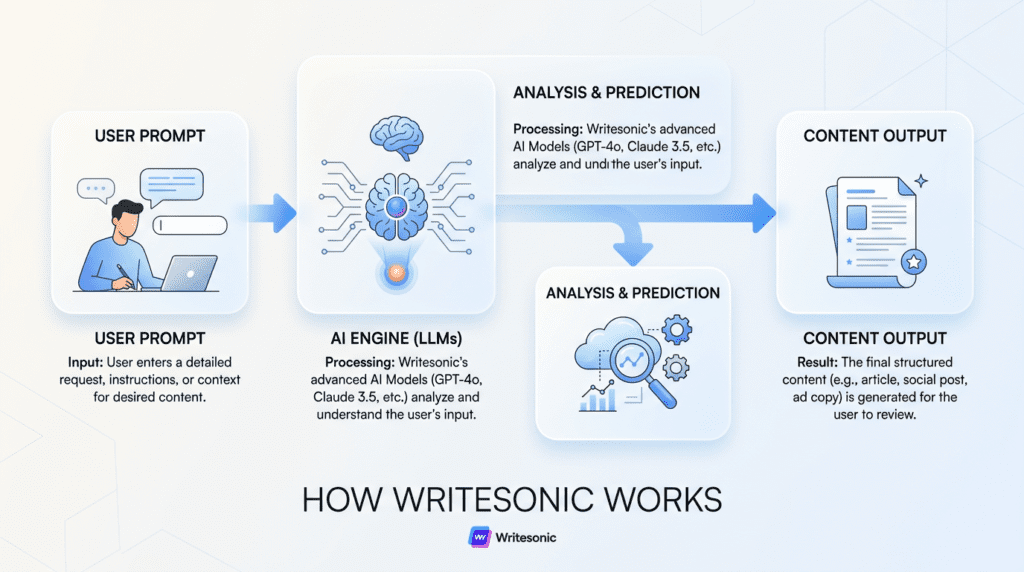
Writesonic, like many advanced AI writing tools, is built on top of sophisticated Large Language Models (LLMs). Think of these LLMs as incredibly intelligent digital brains that have “read” and processed an enormous amount of text data from the internet – everything from books and articles to websites and social media posts. This massive training allows them to understand context, grammar, style, and even nuances of human language. When you use Writesonic, you’re essentially tapping into the predictive power of these models, often including cutting-edge versions like GPT-4, which can generate human-like text based on the patterns they’ve learned. They don’t “think” like humans, but they’re exceptionally good at predicting the most probable next word or phrase to complete a given thought or instruction.
From Prompt to Output: The Generation Process
The journey from your idea to a finished piece of content with Writesonic starts with your input, often called a “prompt.” This is where you tell the AI what you want it to write. You’ll typically provide keywords, a brief description, a desired tone, and the type of content you need (e.g., a blog post, an ad headline, a product description). Once you hit “generate,” Writesonic’s AI engine takes over. It analyzes your input, breaks it down, and then uses its LLM capabilities to predict and assemble text that matches your request. It’s an iterative process; the AI doesn’t just pull pre-written sentences. Instead, it generates new, unique content word by word, constantly evaluating context and coherence based on its vast training data. The better and more specific your prompt, the more relevant and high-quality the initial output will be.
Training Data and Factual Accuracy
It’s crucial to remember that while Writesonic’s AI is incredibly powerful, it’s only as good as the data it was trained on. This training data, while vast, has a cutoff point and can sometimes contain outdated or even incorrect information. This means that while the AI can generate grammatically correct and coherent text, it doesn’t inherently “know” facts in the way a human does. It predicts what sounds plausible based on its training. Therefore, any content generated by Writesonic, especially when dealing with statistics, dates, names, or specific industry details, absolutely requires human review for factual accuracy. Relying solely on AI for factual content without verification is a common pitfall that can lead to misinformation and damage credibility.
Understanding “Quality Levels” (Premium vs. Superior)
When you’re using Writesonic, you’ll often see options to select different “quality levels,” such as Premium or Superior. This isn’t just a marketing gimmick; it directly impacts the underlying AI model Writesonic uses for your content generation. Generally, “Superior” quality taps into a more advanced and powerful LLM (like a more recent or larger version of GPT-4), which has been trained on even more data and is capable of producing more nuanced, creative, and human-like text. The “Premium” option might use a slightly less advanced but still very capable model. Choosing “Superior” often means you’ll get higher-quality, more original, and less repetitive output, especially for longer-form content or tasks requiring more creativity. However, these higher-quality generations typically consume more “credits” from your Writesonic plan, so it’s a trade-off between output quality and credit usage. For simple tasks like short ad copy, Premium might be perfectly sufficient, while for a detailed blog post, Superior could be worth the extra credits.
The Writesonic Dashboard: A First-Look Tour for New Users
When you first log into Writesonic, you’re greeted by a dashboard designed to be your central hub for all content creation. It’s where your journey with the AI writing tool truly begins, offering a blend of quick access and organized functionality. Understanding this initial layout is key to efficiently using the platform.

Navigating the Main Workspace
The Writesonic dashboard typically features a clean, intuitive layout. On the left side, you’ll usually find a primary navigation sidebar. This sidebar is your gateway to different sections like the “AI Article Writer,” “Sonic Editor,” “Templates” (or “Feature Library”), “History,” and “Account Settings.” The main central area, or workspace, is where your chosen tool or document will appear, allowing you to input prompts, view generated content, and perform edits. At the top, you might see quick access to your current plan details, credit usage, and notifications. For a new user, it can feel like a lot at once, but the consistent placement of these elements makes it easier to learn over time.
Finding the Right Tool: The Feature Library
Writesonic boasts a comprehensive “Feature Library” (sometimes simply called “Templates”) packed with specialized AI tools for various content needs. Instead of a single “write anything” button, you’ll find dedicated generators for blog post ideas, ad copy, product descriptions, social media updates, and more. To find what you need, you can often browse by category (e.g., “Blog,” “eCommerce,” “Ads,” “Website Copy”) or use a search bar if you know the specific tool you’re looking for, like “Paraphraser” or “Sentence Expander.” This structured approach helps guide users to the most appropriate AI model for their task, ensuring more relevant and higher-quality output. It also prevents the common beginner frustration of trying to force a general AI into a specific content format.
Understanding Your Word Count and Credits
A crucial aspect of using Writesonic, especially for those on paid plans, is understanding how your word count and credits are consumed. Writesonic operates on a credit system, where generating content uses up a certain number of words or credits from your monthly allowance. The platform typically offers different “quality levels” for its AI output, often labeled “Premium” and “Superior.” As discussed previously, “Superior” quality leverages more advanced AI models, like GPT-4, and generally consumes credits at a higher rate than “Premium” quality.
For instance, generating a 1,000-word article using “Superior” quality might consume 2,000 “Superior” words or a higher number of “Premium” words, depending on the specific plan and conversion rates. It’s not always a 1:1 ratio, and the exact consumption can vary based on the complexity of the task and the length of the generated output. This system means you need to be mindful of your usage, particularly when generating longer pieces or experimenting with different outputs. Running out of credits mid-project is a common hidden frustration for users, often leading to unexpected pauses in their workflow. The dashboard usually provides a clear meter or counter showing your remaining credits, allowing you to monitor your usage and decide if an upgrade makes sense for your current content demands.
Accessing Your Saved Documents and History
Every piece of content you generate or edit in Writesonic is typically saved automatically within your account. The “History” or “Documents” section, usually accessible from the main navigation, acts as your archive. Here, you can find all your past projects, drafts, and generated outputs organized by date or project name. This feature is invaluable for several reasons: it allows you to revisit older content for repurposing, pick up an editing session where you left off, or compare different versions of AI-generated text. For busy content creators, this centralized storage ensures that no work is lost and provides a seamless way to manage multiple content pieces without having to download and re-upload files constantly.
A Step-by-Step Guide to Creating a Blog Post with AI Article Writer 5.0
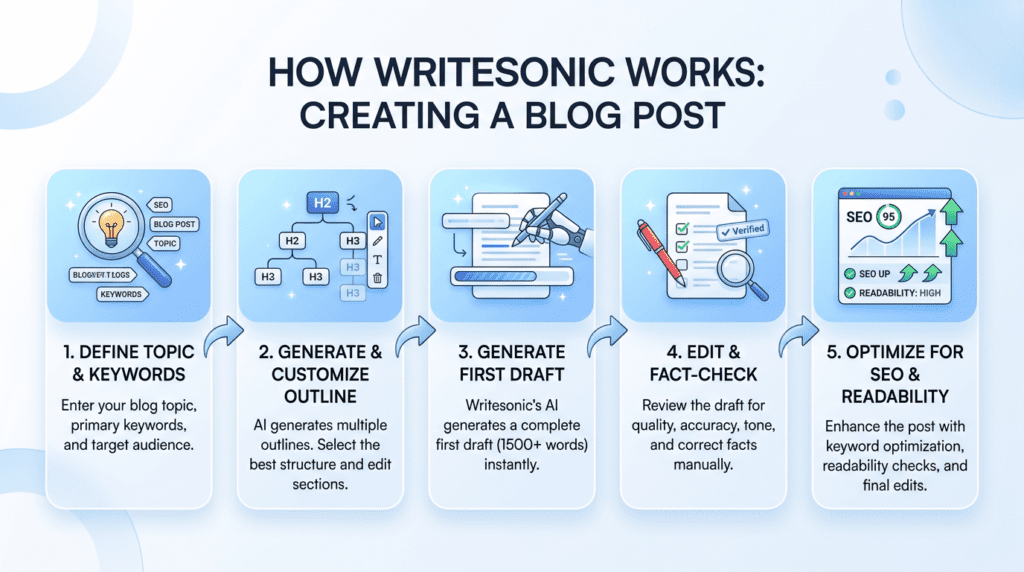
One of Writesonic’s most popular and powerful features is its AI Article Writer, now in its 5.0 iteration. This tool is designed to take you from a basic idea to a full-length blog post draft with remarkable speed. Let’s walk through the process.
Step 1: Defining Your Topic and Keywords
The first interaction with the AI Article Writer 5.0 involves providing it with a clear direction. You’ll typically start by entering your primary topic or title idea. Think of this as the central theme of your blog post. Below that, you’ll be prompted to input target keywords. These aren’t just random words; they’re the terms your audience is likely searching for, and they help the AI understand the specific angle and SEO focus of your article. For example, if your topic is “Best Email Marketing Software,” your keywords might include “email marketing tools,” “email service provider comparison,” and “affordable email marketing.” The more precise and relevant your inputs here, the better the AI can tailor its output, ensuring your content aligns with search intent and provides value to your readers.
Step 2: Generating and Customizing the Outline
Once you’ve provided your topic and keywords, Writesonic’s AI will analyze them and generate a suggested outline for your blog post. This isn’t just a generic structure; it’s an intelligent proposal based on common blog post formats and the context of your inputs. You’ll see main headings (H2s) and often sub-headings (H3s) that the AI believes are relevant and comprehensive.
This is a critical juncture where human oversight is paramount. While the AI is good, it’s not perfect. You have the power to review, edit, add, remove, or reorder any of the suggested sections. For instance, if the AI misses a crucial point you want to cover, you can easily insert it. If a suggested section feels redundant, you can delete it. This customization step ensures the final article reflects your unique perspective and covers all the necessary points for your target audience, preventing the creation of a bland or off-topic draft. Skipping this step often leads to a first draft that requires significantly more heavy editing later on.
Step 3: Generating the First Draft
With your customized outline in place, the next step is often a single click: “Generate Article.” Writesonic’s AI Article Writer 5.0 then takes your refined outline and begins to flesh out each section, writing paragraphs, sentences, and transitions to create a cohesive first draft. This process usually takes a few moments, depending on the length and complexity of your outline.
What you receive is a complete, albeit raw, article. It’s important to approach this output with the understanding that it is a *draft*. It will have a logical flow based on your outline, but it might lack your unique voice, specific examples, or the nuanced insights that only a human writer can provide. For many, this is where the real time-saving power of Writesonic shines: it eliminates the blank page syndrome and provides a solid foundation to build upon, rather than requiring you to write every word from scratch.
Step 4: Editing and Fact-Checking in the Sonic Editor
After the AI generates your first draft, it typically opens directly into the “Sonic Editor.” This is where you transform the AI’s raw output into a polished, publish-ready piece. The Sonic Editor isn’t just a basic text editor; it’s equipped with several AI-powered tools designed to assist your refinement process. You can highlight sentences or paragraphs and use options to rewrite, expand, shorten, or paraphrase them. This is incredibly useful for improving flow, varying sentence structure, or making the tone more consistent with your brand.
However, the most crucial aspect of this stage is fact-checking. As discussed earlier, AI models are trained on vast datasets but can sometimes generate information that is outdated, inaccurate, or simply fabricated (known as “hallucinations”). Therefore, every claim, statistic, or piece of data in the AI-generated draft *must* be verified against reliable sources. For an affiliate marketer writing a product review, this means checking product specifications. For a blogger explaining a concept, it means cross-referencing definitions. This human verification step is non-negotiable for maintaining credibility and trust with your audience. Neglecting this can lead to publishing misinformation, which can severely damage your reputation.
Step 5: Optimizing for SEO and Readability
The final stage in the Writesonic workflow for a blog post involves optimizing it for both search engines and human readers. The Sonic Editor often includes integrated SEO features that can help you analyze your content. These tools might check for keyword density, suggesting where you could naturally incorporate your target keywords more effectively without keyword stuffing. Some versions may also offer readability scores (like Flesch-Kincaid), highlighting complex sentences or paragraphs that could be simplified for a broader audience.
Beyond the built-in tools, this is also your opportunity to manually review the article for overall clarity, engagement, and flow. Add internal links to other relevant posts on your site, ensure external links point to authoritative sources, and craft a compelling meta description and title tag if not already done. This comprehensive optimization ensures that your AI-assisted content not only ranks well in search results but also provides a valuable and enjoyable experience for anyone who reads it.
Beyond Articles: How Writesonic’s Other Key Features Work in Practice
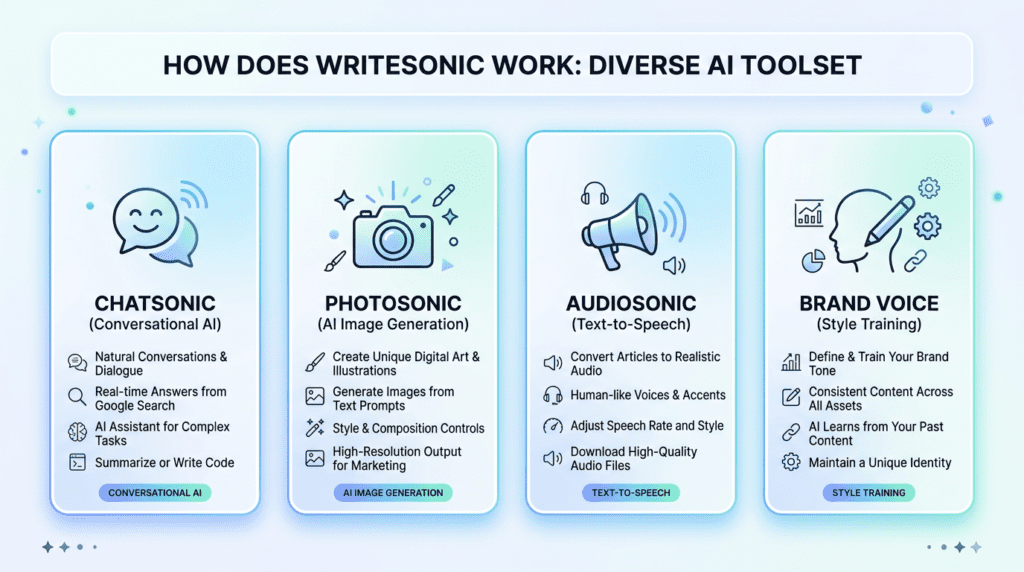
While generating full articles is a core strength, understanding how Does Writesonic Work extends to its other specialized tools. These features tackle different content needs, from quick social media updates to visual and audio content, expanding the platform’s utility for diverse users.
Chatsonic: Your AI Conversational Partner
Chatsonic acts like an advanced AI chatbot, similar to ChatGPT, but integrated directly into the Writesonic ecosystem. Instead of following a structured template for content generation, you interact with Chatsonic conversationally. You can ask it questions, request short pieces of content, or even have it brainstorm ideas with you.
For example, if you need a catchy email subject line for a new product launch, you can simply type, “Give me five email subject lines for a new AI writing tool that helps bloggers.” Chatsonic will respond with several options. It’s excellent for generating quick social media posts, tweet ideas, ad headlines, or even summarizing complex topics. Many users find it invaluable for overcoming writer’s block or getting a fresh perspective on a topic. It’s less about long-form output and more about rapid, iterative content generation and idea exploration.
Photosonic: Creating AI Images from Text Prompts
Visual content is crucial for engaging audiences, and Photosonic allows you to generate unique images directly from text prompts. This feature explains how Does Writesonic Work not just with text, but also with visual AI. You describe the image you want, and the AI creates it. For instance, you could type, “A futuristic robot writing a blog post on a laptop, vibrant colors, digital art style.”
The key to good results with Photosonic is clear, descriptive prompts. Beginners often struggle with vague requests, leading to generic or unexpected images. Over time, users learn to specify styles, colors, subjects, and actions to guide the AI more effectively. This can save time and money compared to stock photos, especially for unique or abstract concepts. However, it’s important to review the generated images, as AI can sometimes produce odd or imperfect results that need refinement or regeneration.
Audiosonic: Turning Your Articles into Voiceovers
Audiosonic is Writesonic’s text-to-speech feature, designed to convert your written content into natural-sounding audio. This is particularly useful for repurposing blog posts into podcast episodes, creating accessible content for visually impaired users, or simply offering an alternative consumption method for your audience.
The process is straightforward: you paste your article text into Audiosonic, choose a voice (male or female, various accents), and the AI generates an audio file. While the voices are generally high quality, they may not always capture the full emotional nuance of a human narrator. For many, the convenience and speed of generating audio content far outweigh this minor trade-off, especially for informational or tutorial-based content. It’s a powerful way to extend the reach of your written work without hiring voice actors.
Brand Voice: Training the AI to Write Like You
Maintaining a consistent brand voice is vital for any business, and Writesonic offers a “Brand Voice” feature to help with this. This tool allows you to “train” the AI on your specific writing style, tone, and vocabulary. You typically do this by providing examples of your existing content, either by pasting text snippets or providing a URL to your website.
Once trained, the AI attempts to mimic your brand’s unique style when generating new content. This means less time spent editing AI output to match your established tone, making your content workflow much more efficient. For businesses with strict brand guidelines or multiple content creators, this feature ensures that all generated text, whether it’s a blog post or a social media update, sounds authentically “you.” It helps answer how Does Writesonic Work to integrate seamlessly into your existing brand identity.
Who Benefits Most from Using Writesonic? (Real-World Scenarios)
Understanding how Does Writesonic Work in various contexts helps identify its ideal users. It’s not a one-size-fits-all solution, but certain roles and businesses can leverage its capabilities significantly.
For Bloggers & Content Marketers
Bloggers and content marketers are among Writesonic’s most enthusiastic users. The platform excels at speeding up the content creation process, which is often a major bottleneck. For instance, a blogger struggling with writer’s block can use Writesonic to generate dozens of blog post ideas, create detailed outlines, or even produce a full first draft in minutes. This dramatically reduces the time spent staring at a blank page.
For content marketers focused on SEO, Writesonic can help scale content production. Instead of spending hours researching and writing, they can generate multiple articles targeting specific keywords, then refine and optimize them. This allows for a higher volume of content, which is crucial for improving search engine rankings. It’s particularly useful for creating evergreen content, listicles, or informational articles where speed and volume are key.
For Small Business Owners
Small business owners often wear many hats, and content creation can be a significant time sink or an expensive outsourced task. Writesonic offers a cost-effective solution. A local bakery owner, for example, could use it to quickly generate engaging social media posts about daily specials, write compelling product descriptions for their online store, or draft website copy for a new service page.
An e-commerce entrepreneur might use Writesonic to create hundreds of unique product descriptions, saving countless hours. The tool helps small businesses maintain a consistent online presence and professional image without needing to hire a dedicated copywriter or spend hours crafting every piece of text themselves. It democratizes access to high-quality marketing copy.
For Marketing Agencies
Marketing agencies manage content for multiple clients, making scalability and efficiency paramount. Writesonic can serve as a powerful assistant for agency teams. Imagine an agency needing to create ad copy for five different clients across various platforms. Writesonic can generate multiple variations of ad headlines, body copy, and calls to action in minutes, allowing the agency to test and iterate much faster.
It’s also valuable for generating email campaign sequences, landing page copy, or even initial drafts of client blog posts. This frees up human copywriters to focus on higher-level strategy, client communication, and refining the AI-generated content to perfectly match each client’s unique brand voice and campaign goals. It’s a tool for increasing output and maintaining consistency across diverse client portfolios.
For Students & Academics
While not its primary target audience, students and academics can find Writesonic useful as a research assistant and writing aid. For example, it can help summarize complex articles, brainstorm essay topics, or structure an academic paper. A student might use it to generate different ways to phrase a sentence or to expand on a concept they’re struggling to articulate.
However, it’s crucial to emphasize a strong caveat: Writesonic is an aid, not a replacement for original thought or ethical academic practice. Students must always fact-check any AI-generated information, cite sources properly, and ensure their work is original. Using AI to generate entire essays without critical review and proper citation constitutes plagiarism and can have serious academic consequences. It’s a tool for enhancing productivity and understanding, not for bypassing the learning process.
What Are the Practical Limitations of Writesonic?
While understanding how Does Writesonic Work reveals its many benefits, it’s equally important to be aware of its limitations. No AI tool is perfect, and recognizing these drawbacks helps users set realistic expectations and integrate the tool effectively into their workflow.
The Necessity of Human Editing and Fact-Checking
This is perhaps the most critical limitation: Writesonic is a writing *assistant*, not a fully autonomous writer. Every piece of content generated by the AI, regardless of quality setting, requires human review. This isn’t just about grammar and spelling; it’s about accuracy, tone, originality, and relevance.
AI models are trained on vast datasets, but they don’t “understand” facts in the human sense. They can sometimes “hallucinate” information, presenting false data as fact. Therefore, for any content where accuracy is paramount (e.g., medical articles, financial advice, news), human fact-checking is non-negotiable. Additionally, AI-generated content can sometimes sound generic or lack the unique voice and nuanced perspective that a human writer brings. Over-reliance without editing can lead to content that feels uninspired or even misleading.

Potential for Repetitive or Generic Content
Because AI models learn from patterns in existing data, there’s a risk of generating content that feels repetitive or generic, especially if the prompts are broad or if the AI is used for very common topics. If you ask for a “blog post about healthy eating” without much specific direction, the output might sound like countless other articles on the same subject.
To combat this, users need to refine their prompts, providing specific angles, unique keywords, and desired tones. The Sonic Editor, as discussed earlier, becomes essential here. Users often find themselves editing to inject more personality, specific examples, or a fresh perspective that the AI might miss. This is a common frustration for beginners who expect a perfect, ready-to-publish piece on the first try.
Challenges with Highly Niche or Technical Topics
Writesonic, like most AI writing tools, performs best with topics that have a large amount of publicly available training data. When it comes to highly niche, specialized, or cutting-edge technical subjects, the AI may struggle. It might produce superficial content, make factual errors, or simply not have enough information to generate a comprehensive or accurate piece.
For experts in a very specific field, the AI’s output might feel basic or even incorrect. In these cases, the AI can still be useful for generating outlines, brainstorming ideas, or rephrasing existing content, but the heavy lifting of deep research and nuanced writing will still fall to the human expert. The trade-off is often speed versus depth and accuracy in specialized domains.
Understanding the Cost Structure
How Does Writesonic Work with its pricing model is another practical limitation, particularly for heavy users. Writesonic operates on a credit-based system, where different types of content generation consume varying amounts of “words” or credits. Generating a long-form article at “Superior” quality will consume significantly more credits than a short social media post at “Premium” quality.
This means that while the platform offers a lot of power, users need to be mindful of their usage to manage monthly costs. Generating multiple drafts, experimenting with different prompts, or consistently using the highest quality settings can quickly deplete credits, potentially leading to unexpected charges or the need to upgrade plans. It requires a strategic approach to content generation to maximize value and avoid overspending, especially for those on tighter budgets.
Final Verdict: Is Writesonic the Right AI Writing Tool for You?
Writesonic works by leveraging powerful AI models to automate the most time-consuming parts of content creation. It excels as a versatile assistant for marketers, bloggers, and business owners who need to produce a high volume of content efficiently. Its strength lies in its wide array of tools, from article generation to AI image creation. However, it’s not a “set it and forget it” solution. The best results come when it’s used to create a solid first draft that is then refined, fact-checked, and personalized by a human editor. If you understand this collaborative role, Writesonic can be a powerful addition to your workflow.
Ultimately, Writesonic is the right tool for you if your primary goal is to significantly accelerate content production while maintaining quality through human oversight. It’s particularly well-suited for individuals and teams who frequently face writer’s block, need to scale their content efforts for SEO, or require diverse content types like blog posts, ad copy, and social media updates. Its comprehensive suite, including Chatsonic for quick ideation and Photosonic for visual assets, makes it a strong contender for those seeking an all-in-one content generation platform. However, if your content needs are minimal, highly specialized, or demand deep, original research without any human intervention, the investment in an AI assistant might not yield its full value. For anyone looking to supercharge their content strategy and treat AI as a powerful co-pilot rather than an autonomous replacement, Writesonic offers a robust and effective solution.
Frequently Asked Questions (FAQ)
How much does Writesonic cost to use?
Writesonic operates on a subscription model with various tiers, typically based on word credits and feature access, and specific pricing details are available on their official website.
Can Google detect content written by Writesonic?
While AI detection tools exist, Google’s algorithms primarily focus on content quality, relevance, and helpfulness to users, rather than the origin of the writing, meaning well-edited and fact-checked AI-generated content can rank effectively.
Is the content generated by Writesonic plagiarism-free?
Writesonic aims to produce original content, but it’s always recommended to use a plagiarism checker on any AI-generated text, especially for academic or sensitive professional use, to ensure uniqueness and proper citation where necessary.
How does Writesonic’s “Brand Voice” feature actually work?
The Brand Voice feature allows you to train the AI to mimic your specific writing style and tone by providing examples of your existing content, ensuring consistency across all generated outputs.
What is the difference between Writesonic and Chatsonic?
Writesonic is the broader platform offering a wide range of content generation tools (articles, ads, emails), while Chatsonic is a specific conversational AI assistant within Writesonic, designed for interactive brainstorming, quick queries, and short-form content generation.
How long does it take to generate a full article with Writesonic?
Generating a full first draft of an article with Writesonic can take just a few minutes, depending on the length and complexity, though human review and editing will add to the overall completion time.