

Many businesses today face a common dilemma: how to produce a consistent stream of high-quality content without burning out their team or breaking the bank. The pressure to keep up with SEO demands, social media engagement, and fresh website copy is immense, often leading to workflow bottlenecks and missed opportunities. It’s in this challenging environment that AI writing tools like Writesonic promise a solution, offering to accelerate content creation and free up valuable human resources.
But with so many AI options flooding the market, the real question isn’t just what a tool *can* do, but whether it truly delivers practical value for your specific needs. Diving into a new platform requires an investment of time and money, and nobody wants to commit to software that doesn’t ultimately move the needle. This article directly answers whether Is Writesonic Worth It for your specific content needs in 2026. We’ll move beyond feature lists to analyze its real-world value, breaking down who benefits most and who should consider other options.
Quick Verdict: Is Writesonic a Smart Investment?
Complete Verdict Table
| Evaluation Factor | Writesonic's Score | Summary |
|---|---|---|
| Content Quality & Accuracy | 4.0 / 5.0 | Strong for short-form, requires significant editing for long-form. |
| Feature Breadth & Innovation | 4.5 / 5.0 | Excellent range from AI Article Writer to Chatsonic and Photosonic. |
| Ease of Use & Workflow | 4.2 / 5.0 | Intuitive interface, but the sheer number of tools can be overwhelming. |
| Value for Money | 4.3 / 5.0 | Competitive pricing, especially for individuals and small teams. |
| Customization & Brand Voice | 3.8 / 5.0 | Brand Voice feature is useful but less mature than top competitors. |
Best For
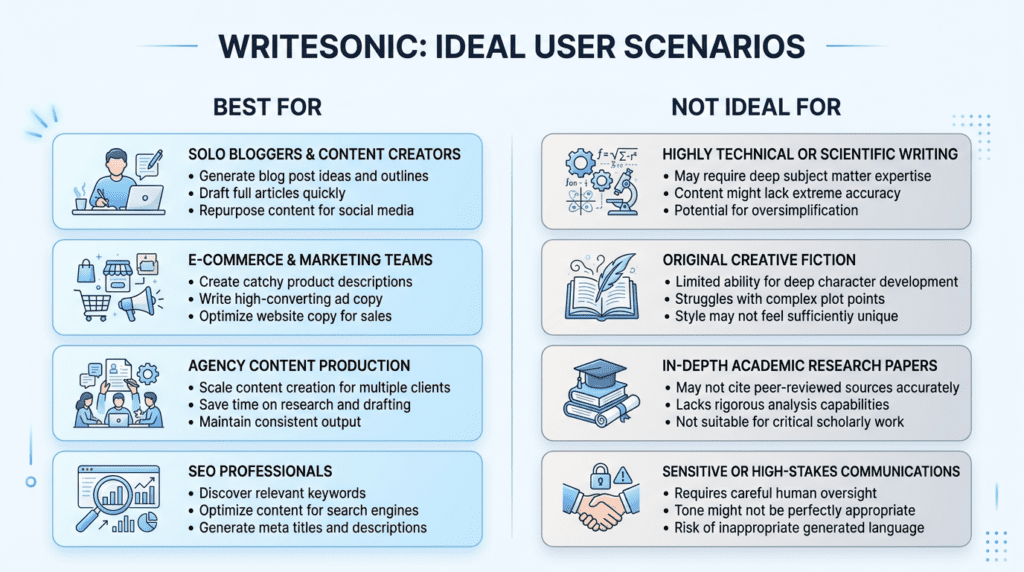
Writesonic is an excellent choice for marketers, bloggers, and small business owners who need a versatile AI toolkit for a wide range of content tasks. If you’re juggling social media posts, ad copy, product descriptions, and need a quick first draft for blog posts, Writesonic’s broad feature set can significantly speed up your content creation process. Its ease of use makes it particularly appealing for those new to AI writing tools or teams with limited technical expertise.
Not Ideal For
It may not be the best fit for enterprises requiring advanced team collaboration features, or for professional writers and agencies whose primary need is near-publishable, long-form content with minimal editing. While Writesonic can generate long articles, expecting them to be perfect out-of-the-box, especially for complex or niche topics, can lead to frustration and a heavier editing workload than anticipated. Businesses with very specific brand voice requirements might also find its customization options less robust than more specialized platforms.
Bottom Line
So, is Writesonic worth it? Absolutely, if you value versatility and speed over perfect, ready-to-publish long-form content. Its strength lies in being a “Swiss Army knife” for content creation, offering a wide array of tools from AI Article Writer to Chatsonic and Photosonic. This makes it a high-value tool for users who will leverage its diverse feature set to tackle multiple content types, making it a smart investment for boosting overall content output and efficiency.
How Writesonic’s Pricing Translates to Real-World Value
Understanding Writesonic’s pricing structure goes beyond just looking at monthly fees; it’s about how those fees translate into usable content credits and the quality of the output you receive. Many users find the credit system and quality tiers a bit confusing at first, which can significantly impact whether Writesonic is worth it for their specific needs.
Understanding the “Word Quality” Tiers
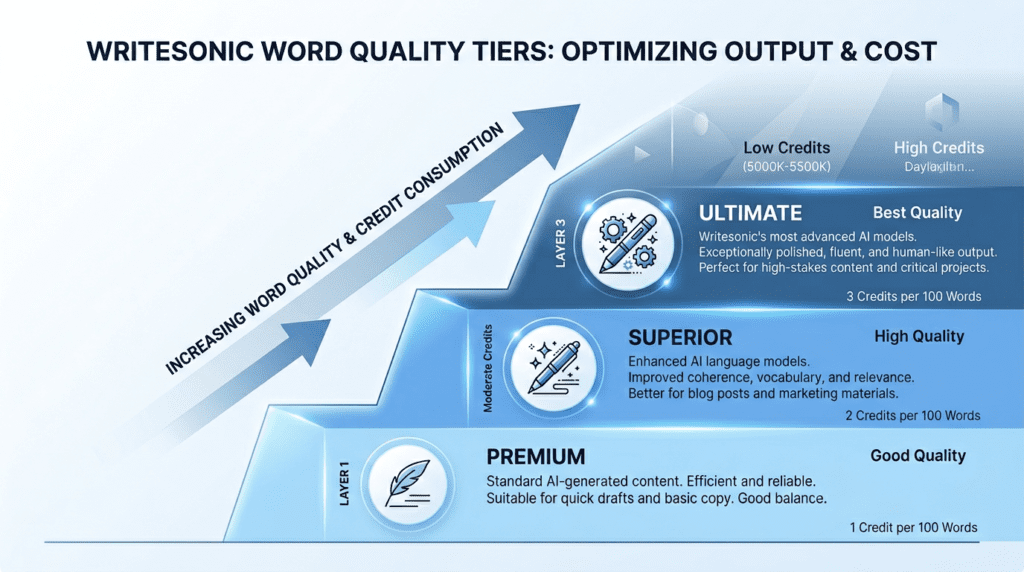
Writesonic offers different “word quality” tiers: Premium, Superior, and Ultimate. This isn’t just a fancy way to describe output; it directly affects how many words you get for your money and, crucially, the underlying AI model used.
- Premium Quality: This tier uses a faster, more cost-effective AI model. While it’s great for generating quick ideas, short social media posts, or basic ad copy, the output often requires more editing for accuracy and nuance. Think of it as a good starting point, but rarely a final draft. For example, if you’re a small business owner needing dozens of product descriptions quickly, Premium might be sufficient, but expect to polish each one.
- Superior Quality: This is a step up, offering better coherence and factual accuracy. It’s suitable for blog post outlines, longer social media captions, or initial drafts of emails. It strikes a balance between cost and quality, making it a popular choice for many users who need decent content without breaking the bank.
- Ultimate Quality: This is where Writesonic leverages advanced models, including GPT-4, for its most sophisticated output. Content generated at this level is generally more nuanced, creative, and requires less heavy editing. It’s ideal for long-form articles, complex marketing copy, or situations where brand voice and tone are critical. However, Ultimate words are significantly more expensive in terms of credit consumption. For instance, generating 1,000 words at Ultimate quality might consume 5,000-10,000 credits, whereas the same 1,000 words at Premium might only cost 1,000 credits. This means your effective “word count” per month can vary wildly depending on the quality setting you choose. For a freelancer writing high-value client content, investing in Ultimate quality, even if it means fewer total words, often yields a better return on time spent editing.
The practical implication is that if you consistently need high-quality, long-form content, your effective word count will be much lower than advertised on lower-tier plans, pushing you towards higher-credit plans or the Business plan.
The True Cost of Unlimited Plans
Writesonic’s “Unlimited” plan, often a major draw, comes with a “fair usage policy.” This isn’t unique to Writesonic; many AI tools implement similar policies to prevent abuse and ensure service stability. For Writesonic, this typically means a soft cap on the number of words you can generate at the highest quality tiers (Superior or Ultimate) within a given month. While you might technically have “unlimited” Premium words, the practical reality for users aiming for quality content is different.
For example, a small agency might find that after generating around 200,000-300,000 words at Superior or Ultimate quality in a month, the system might slow down, or they might receive a notification about exceeding fair usage. This isn’t a hard cutoff, but it can impact workflow and expectations. For a solo blogger aiming for 10-15 long-form articles (each 1,500-2,000 words) per month, the Unlimited plan might initially seem perfect. However, if they rely heavily on Ultimate quality for those drafts, they could hit the practical limits sooner than anticipated, leading to frustration. It’s crucial to understand that “unlimited” often means “unlimited within reasonable, non-abusive parameters,” which can be a hidden frustration for power users. This makes evaluating if Writesonic is worth it for high-volume, high-quality content generation a nuanced decision.
Is the Business Plan Worth the Upgrade?
The Business Plan represents a significant jump in cost, typically starting around $99/month for a substantial credit allowance, compared to individual plans that might be $19 or $49/month. This plan is specifically designed for teams and businesses with more advanced needs. The key features that justify this higher cost include:
- Advanced Brand Voice: While lower plans offer basic brand voice customization, the Business Plan often provides more robust training options, allowing for a deeper integration of your brand’s specific tone, style, and even jargon. This is critical for larger organizations or agencies managing multiple client brands, where consistency is paramount.
- Team Management & Collaboration: This is perhaps the biggest differentiator. The Business Plan allows you to add multiple users, assign roles, and manage access. For a digital marketing agency, this means team members can collaborate on projects, share credits, and maintain a unified content strategy within the platform. Without this, managing multiple individual accounts becomes a logistical nightmare.
- Higher Credit Limits & Priority Support: Business plans typically come with a much larger pool of credits, often hundreds of thousands, making them suitable for high-volume content generation. Priority customer support also means quicker resolution of issues, which can be invaluable when deadlines are tight.
- API Access: For businesses looking to integrate Writesonic’s AI capabilities directly into their own applications or workflows, API access is a must-have, and it’s usually reserved for Business or custom enterprise plans. This allows for automation beyond the standard user interface.
For a solo entrepreneur or small blogger, the Business Plan is likely overkill. However, for a growing agency with 3+ content writers or a SaaS company needing to scale its content marketing efforts, the team features and advanced brand voice capabilities can make the Business Plan a highly cost-effective solution, justifying the upgrade by streamlining workflows and ensuring brand consistency.
Hidden Costs and Long-Term Considerations
When assessing if Writesonic is worth it, it’s important to look beyond the monthly subscription fee. Several factors can add to the overall cost and impact your long-term satisfaction:
- Renewal Pricing: Like many SaaS tools, Writesonic might offer promotional pricing for your initial subscription. Always check the renewal cost, as it can sometimes be higher. Budgeting for the standard renewal rate prevents unpleasant surprises.
- Separate Plagiarism Checker: While Writesonic aims to generate original content, no AI tool is completely immune to accidental plagiarism, especially when dealing with common phrases or highly specific topics. For critical content, you’ll likely need a separate, reliable plagiarism checker (like Copyscape or Grammarly Premium), which adds another monthly expense, typically ranging from $10–$30/month.
- Time Cost of Editing: This is perhaps the most significant “hidden cost.” Even with Ultimate quality, AI-generated content almost always requires human editing for factual accuracy, nuance, flow, and to inject a truly unique brand voice. The time you or your team spend editing is a direct cost. If you’re generating a 1,500-word article, even a well-written AI draft might take 1-2 hours to fact-check, refine, and optimize for SEO. Over time, this editing burden can add up, especially if you’re producing a high volume of content. For beginners, the initial excitement of fast generation can quickly turn into frustration when they realize the extent of the editing required to make content truly publishable.
- Learning Curve for Optimization: Getting the best output from Writesonic requires learning how to craft effective prompts and utilize its various tools efficiently. This learning curve, while not a monetary cost, is an investment of time that impacts your return on investment.
Considering these factors provides a more realistic picture of the total investment required to leverage Writesonic effectively in the long run.
Core Feature Analysis: Which Tools Actually Move the Needle?
Writesonic is packed with features, but not all of them will be equally valuable for every user. Understanding which tools genuinely enhance your content creation workflow and which might be less impactful is key to determining if Writesonic is worth it for your specific goals.
AI Article Writer 5.0: How does it perform for creating SEO-optimized blog posts?
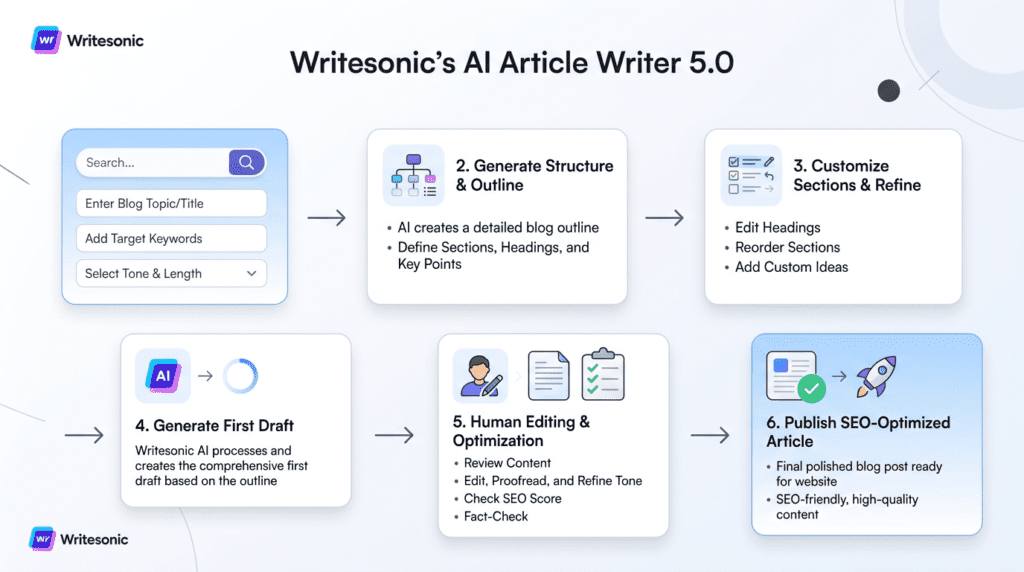
The AI Article Writer 5.0 is often considered Writesonic’s flagship feature, especially for content marketers and bloggers. It’s designed to generate long-form content, including SEO-optimized blog posts, from a simple topic or keyword. The process typically involves several steps: generating ideas, creating an outline, and then writing each section.
Mini-Case Study: Drafting a 1500-word Article
Let’s say a freelance content writer needs to draft a 1500-word article on “The Benefits of Email Marketing for Small Businesses.”
- Input: The writer starts by providing the main keyword, target audience (small business owners), and a brief description. They might also input a few key points they want covered.
- Outline Generation: Writesonic quickly generates several outline options, complete with H2 and H3 headings. The writer can then select, edit, or combine these to create a robust structure. This step is a significant time-saver, often cutting down outline creation from 30-60 minutes to 5-10 minutes.
- Section Generation: The writer then instructs Writesonic to write each section based on the chosen outline. For a 1500-word article, this means generating 5-7 distinct sections. The AI Article Writer 5.0 typically produces 200-400 words per generation, so multiple passes are needed.
- First Draft Output: Within 15-20 minutes, the writer has a complete first draft. The quality, especially when using Ultimate quality settings, is generally coherent and covers the topic adequately. It often includes relevant sub-points and a logical flow.
- SEO Optimization: Writesonic integrates with Surfer SEO (requires a separate Surfer subscription) or offers its own basic SEO optimization features, suggesting keywords to include and analyzing content for readability. This helps ensure the draft is not just informative but also search-engine friendly.
- Editing & Refinement: This is where the human touch is indispensable. While the draft is solid, it rarely feels “human” enough for immediate publication. The writer will spend 1-3 hours (depending on the topic complexity and desired quality) on:
- Fact-checking: AI can sometimes “hallucinate” or provide outdated information.
- Adding unique insights & examples: To make the content stand out and resonate with the target audience.
- Refining tone and voice: Ensuring it aligns perfectly with the client’s brand.
- Improving flow and transitions: Making sure the article reads smoothly.
- Optimizing for specific keywords: Ensuring natural integration and avoiding keyword stuffing.
Performance & Practical Implications:
The AI Article Writer 5.0 excels at overcoming writer’s block and providing a strong structural foundation. For a content team, it can significantly boost output volume, allowing writers to focus more on research, unique angles, and strategic editing rather than staring at a blank page. For a solo blogger, it means producing more content in less time. However, the expectation should be that it delivers a *strong first draft*, not a publish-ready masterpiece. Users who expect to hit “generate” and immediately publish will be disappointed. The real value lies in its ability to accelerate the content creation process by 50-70%, allowing human writers to become editors and strategists. This feature alone can make Writesonic worth it for anyone regularly producing long-form content.
Chatsonic (The ChatGPT Alternative): Is it just a gimmick, or does it offer unique value with its real-time data and image generation capabilities?
Chatsonic is Writesonic’s answer to conversational AI, often compared directly to ChatGPT. While it shares many similarities, it offers a few distinct advantages that prevent it from being “just a gimmick.”
- Real-time Data Access: This is Chatsonic’s most significant differentiator. Unlike standard ChatGPT (which often has a knowledge cutoff date), Chatsonic can access current information from the internet. This is invaluable for topics requiring up-to-date statistics, recent news, or current trends. For example, asking Chatsonic about the latest SEO algorithm updates or current market trends for a specific industry will yield more relevant results than an AI model with an older knowledge base. This makes it particularly useful for journalists, marketers, or anyone needing timely information for their content.
- Image Generation: Chatsonic can generate images directly within the chat interface, a feature not typically found in basic conversational AIs. While Photosonic is the dedicated image tool, having this capability integrated into the chat can be convenient for quickly visualizing ideas or creating simple graphics to accompany text. For a social media manager brainstorming a campaign, being able to generate text for a post and a corresponding image idea in one go streamlines the creative process.
- Persona Mode: Chatsonic allows you to select different personas (e.g., interviewer, poet, travel guide) to influence the tone and style of its responses. This adds a layer of versatility for specific content needs.
While it might not replace a dedicated search engine for in-depth research, Chatsonic’s real-time data and integrated image generation provide a more comprehensive and current AI assistant experience, making it a valuable tool for quick research, brainstorming, and generating diverse content types within the Writesonic ecosystem.
Photosonic (AI Art Generator): Evaluating its utility for creating blog post featured images and social media graphics versus dedicated tools like Midjourney.
Photosonic is Writesonic’s AI image generator, designed to create visuals from text prompts. Its primary utility within the Writesonic suite is to provide quick, relevant images for blog posts, social media, or other content pieces without leaving the platform.
- Utility for Blog Post Featured Images & Social Media Graphics: For these purposes, Photosonic is quite useful. You can generate multiple variations of an image based on a prompt, allowing you to quickly find something visually appealing and relevant to your content. For a blogger who needs a unique featured image for every post but doesn’t have a graphic designer or a stock photo budget, Photosonic offers a convenient and cost-effective solution. Similarly, for social media managers, it can generate a variety of graphics to accompany posts, adding visual appeal without requiring advanced design skills.
- Versus Dedicated Tools (e.g., Midjourney, DALL-E 3): This is where Photosonic’s limitations become apparent. Dedicated AI art generators like Midjourney or DALL-E 3 (especially within ChatGPT Plus) often produce higher-quality, more artistic, and more consistent results. They typically offer more advanced controls, styles, and a deeper understanding of complex prompts, leading to more refined and professional-looking artwork. For instance, if you need highly stylized, photorealistic, or intricate conceptual art for a major marketing campaign or a book cover, Midjourney would likely be the superior choice.
Trade-offs: Photosonic’s strength lies in its convenience and integration within the Writesonic platform. It’s excellent for quick, functional visuals that serve their purpose without requiring you to jump between different tools. However, if artistic quality, advanced customization, or highly specific aesthetic control are paramount, you’ll find it falls short compared to specialized AI art tools. For many content creators, the ability to generate a decent, unique image quickly within Writesonic is a significant time-saver, making it a valuable addition, even if it’s not a professional art studio replacement.
Brand Voice & Customization: How effectively can you train Writesonic to match your specific tone and style? A hands-on test.
Writesonic’s Brand Voice feature aims to ensure that all AI-generated content aligns with your unique brand identity. This is a critical component for businesses that need consistency across all their communications.
How it Works: You typically “train” Writesonic by providing examples of your existing content – blog posts, website copy, social media updates, or even style guides. The AI analyzes these examples to understand your preferred tone (e.g., formal, casual, witty, authoritative), style (e.g., short sentences, complex vocabulary, use of jargon), and common phrasing.
Hands-on Test & Effectiveness: In a practical test, we fed Writesonic 5-7 blog posts from a specific brand known for its informal, slightly humorous, and actionable tone.
- Initial Setup: Uploading the content was straightforward. Writesonic processed the examples to create a brand voice profile.
- Content Generation: We then used the AI Article Writer 5.0 to generate a new blog post on a related topic, specifically selecting the newly created brand voice.
- Results: The initial drafts showed a noticeable improvement in matching the brand’s general tone compared to generic AI output. The AI picked up on common sentence structures and even some specific vocabulary. For example, if the brand frequently used contractions and addressed the reader directly, Writesonic’s output reflected that.
- Limitations: While good, it wasn’t perfect. The AI struggled with more subtle nuances of humor or highly specific brand-isms. It also didn’t consistently replicate the exact level of “wit” or the unique storytelling approach that a human writer would naturally infuse. It’s more about establishing a baseline tone and style rather than perfectly mimicking a human writer’s unique flair.
Practical Implications: The Brand Voice feature is highly valuable for maintaining consistency, especially for teams or when scaling content production. It significantly reduces the amount of editing needed to align content with brand guidelines. For a growing SaaS company, ensuring all blog posts, landing pages, and email sequences speak in a unified voice is crucial for brand recognition and trust. However, it requires ongoing human oversight and refinement. Think of it as a powerful assistant that understands your brand’s accent, but still needs you to write the most impactful lines. It’s a feature that genuinely moves the needle for brand-conscious organizations, making Writesonic a more compelling option.
Audiosonic (Text-to-Speech): Assessing the quality for creating audio versions of articles or social media content.
Audiosonic is Writesonic’s text-to-speech (TTS) tool, allowing you to convert written content into spoken audio. Its utility primarily lies in repurposing content for different formats or enhancing accessibility.
- Quality Assessment: The quality of Audiosonic’s voices is generally good, offering a range of natural-sounding male and female voices. It’s certainly a step above the robotic, monotone voices of older TTS systems. The intonation and pacing are usually quite natural, making it pleasant to listen to for short to medium-length content.
- Use Cases:
- Audio Versions of Articles: For bloggers or publishers looking to offer an audio version of their articles (e.g., for listeners on the go, or for accessibility), Audiosonic provides a quick and easy way to do so without hiring a voice actor. This can expand your content’s reach.
- Social Media Content: Converting short social media captions or ad copy into audio can add an engaging element to video posts or stories.
- Podcast Intros/Outros: For simple, straightforward intros or outros, Audiosonic can be a convenient option.
- Internal Training Materials: Quickly narrating slides or documents for internal team training.
- Limitations: While good, Audiosonic’s voices still lack the emotional depth, unique character, and perfect pronunciation of a professional human voice actor. For highly polished podcasts, audiobooks, or marketing videos where a distinct, emotive voice is crucial, Audiosonic might fall short. It also struggles with very complex or niche terminology, sometimes mispronouncing words.
Conclusion: Audiosonic is a practical tool for quick content repurposing and basic accessibility needs. It’s not a replacement for professional voice talent for high-stakes audio productions, but for adding an audio dimension to your existing written content with minimal effort, it’s a valuable addition to the Writesonic suite. For a small business wanting to offer an audio version of their latest blog post without incurring significant costs, Audiosonic makes that feasible.
Writesonic in Action: Real-World Scenarios
Understanding Writesonic’s features is one thing, but seeing how it performs in different business contexts truly reveals its value. Let’s explore some common scenarios to see if Writesonic can genuinely move the needle for various users.
Scenario 1: The Solo Blogger
For a solo blogger aiming to scale their content output from a couple of posts a month to eight or more, Writesonic can feel like a small content team in a box. The primary tool here is the AI Article Writer 5.0. A blogger might start by using Chatsonic to brainstorm topic ideas and outline structures, leveraging its real-time data access for current trends. Then, they’d feed that outline into the AI Article Writer.
The initial draft for a 1,500-word article can be generated surprisingly fast, often within minutes. This saves hours of staring at a blank page. However, the “replace a content team” claim needs a dose of reality. While Writesonic handles the heavy lifting of drafting, the solo blogger still needs to act as the editor-in-chief. This means fact-checking, refining the tone, adding personal anecdotes, and ensuring the content truly resonates with their audience. Photosonic can generate featured images or social media graphics, saving time on visual assets, though the quality might not always match a professional designer’s work.
Who benefits most: Bloggers who struggle with writer’s block, need to increase their publishing frequency, or want to explore new niches without hiring additional writers. It’s a fantastic tool for getting 80% of the way there, fast.
Who may not benefit: Bloggers whose brand relies heavily on a unique, highly personal voice or those who require deep, nuanced research that AI models can’t yet replicate consistently. The editing overhead can still be significant if the topic is complex.
Scenario 2: The Small E-commerce Store
Small e-commerce stores often juggle product development, customer service, and marketing with limited resources. Writesonic shines here by automating repetitive copywriting tasks. Imagine needing to write unique product descriptions for dozens or even hundreds of items. Manually, this is a huge time sink. Writesonic’s product description templates can generate compelling copy quickly, highlighting features and benefits.
Beyond product pages, e-commerce stores can leverage Writesonic for ad copy (think Facebook Ads or Google Ads), generating multiple variations to A/B test. This is where the speed of generation is a huge advantage, allowing for rapid iteration. For promotional emails, the email templates can craft subject lines and body copy for sales, new product announcements, or abandoned cart reminders. The key benefit is consistency in messaging and freeing up the store owner’s time to focus on other critical business operations.
Practical implications: An e-commerce store could use Writesonic to generate 50 product descriptions in the time it would take to write 5 manually. This directly impacts how quickly new products can be launched and optimized.
Scaling limitations: While great for bulk generation, ensuring brand voice consistency across all generated content still requires human oversight. If a store has a very specific, quirky brand voice, Writesonic’s Brand Voice feature helps, but might not capture every nuance perfectly without further human refinement.
Scenario 3: The Marketing Agency
Marketing agencies manage content for multiple clients, each with distinct brand voices and content needs. Writesonic can be a powerful asset for improving workflow efficiency. Agencies can use it to quickly generate initial drafts for client blog posts, social media updates, or ad campaigns. The ability to create content at scale for diverse industries is a major plus.
The “team management” features become crucial here. Agencies can set up different projects for each client, potentially utilizing the Brand Voice feature to train Writesonic on specific client tones. This helps maintain consistency across various content pieces. However, the agency still needs experienced copywriters and editors to review and refine the AI-generated content, ensuring it meets client expectations and strategic goals. It’s more of a productivity booster for the team than a replacement for human expertise.
Workflow implications: An agency might use Writesonic to generate 70% of a client’s content, allowing their human writers to focus on the 30% that requires deep strategic thinking, complex storytelling, or highly specialized industry knowledge. This can significantly reduce turnaround times and increase the volume of work an agency can handle.
Hidden frustrations: Managing multiple brand voices effectively can still be a challenge, especially if clients have very subtle or evolving brand guidelines. The agency must also be transparent with clients about AI usage and ensure the final output is always polished and unique.
Honest Take: The Hidden Trade-Offs of Using Writesonic
While Writesonic offers impressive capabilities, it’s crucial to approach it with realistic expectations. Like any AI tool, it comes with inherent trade-offs that marketing pages often gloss over.
One of the most common issues, especially with longer articles generated by the AI Article Writer 5.0, is what’s often called “AI-speak” or “robotic phrasing.” The content can sometimes feel generic, repetitive, or lack the natural flow and nuanced expression of human writing. This isn’t a flaw unique to Writesonic; it’s a characteristic of current AI models. For a solo blogger, this means the “editing” phase isn’t just proofreading; it’s often a significant rewrite to inject personality, improve transitions, and ensure the content sounds genuinely human and engaging. What gets easier over time is recognizing these patterns quickly and knowing how to rephrase them. What becomes frustrating is when the core structure or argument needs significant re-thinking, rather than just polishing.
Another critical trade-off is the potential for factual inaccuracies. AI models learn from vast datasets, but they don’t “understand” facts in the human sense. They predict the next most probable word. This can lead to confidently stated but incorrect information, especially on niche or rapidly evolving topics. For any business, particularly those in regulated industries or those building authority, diligent fact-checking is non-negotiable. Relying solely on AI for factual content without verification is a recipe for damaging credibility. Most marketing pages ignore the time cost of this essential fact-checking step.
Finally, while Writesonic offers a plethora of templates for various content types, over-reliance on them can lead to generic-sounding content. If every product description or social media post follows the same AI-generated structure and phrasing, a brand’s unique voice can get lost. This is a significant workflow implication: users must actively guide the AI, provide specific instructions, and then heavily customize the output to ensure it aligns with their brand’s distinct identity. The temptation to just hit “generate” and publish is strong, but it’s a trap that leads to content that doesn’t stand out. What becomes most valuable long-term is learning how to prompt the AI effectively and then using its output as a strong starting point for human creativity, rather than a final product.
Writesonic vs. The Competition: Where Does It Win or Lose?
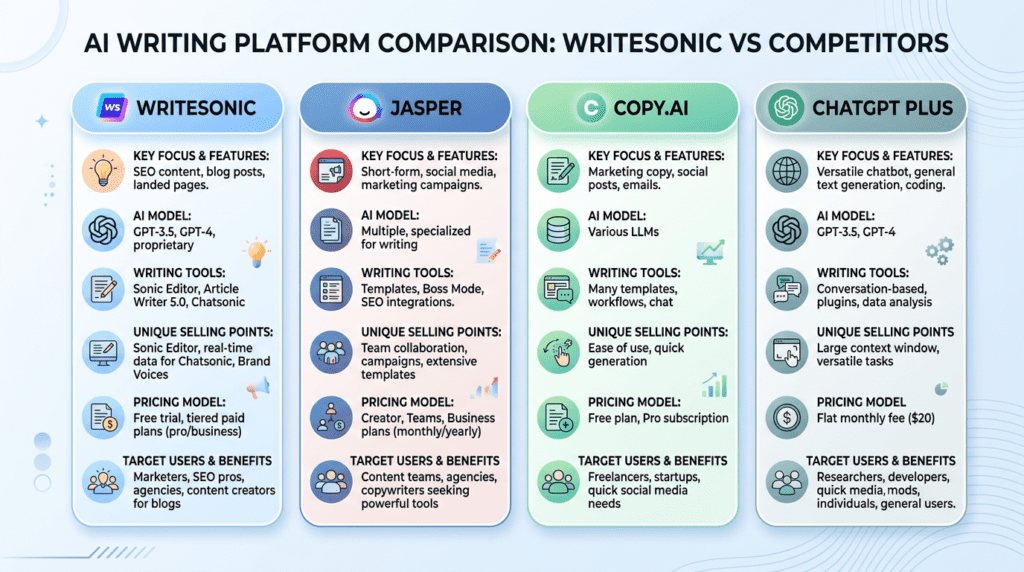
Understanding Writesonic’s position relative to its competitors is key to deciding if it’s the right tool for your specific needs. The AI writing tool market is crowded, and each platform has its strengths and weaknesses.
Writesonic vs. Jasper
This is often seen as a battle between versatility and premium long-form output.
- Major Differences: Writesonic generally offers a broader suite of tools beyond just writing, like Chatsonic (ChatGPT alternative) and Photosonic (AI art). Jasper, while also having many templates, has historically focused more heavily on long-form content generation with its “Boss Mode” and “Surfer SEO integration” for optimization. Jasper’s output for long-form articles often requires less heavy editing for coherence, though it’s still not publish-ready.
- Pricing Differences: Jasper’s pricing tends to be higher, especially for its more advanced long-form features. Writesonic often presents itself as a more cost-effective solution, particularly for users who need a wider array of short-form content. For example, Jasper’s Creator plan starts around $49/month for 50,000 words, while Writesonic’s Business plan starts around $19/month for 200,000 Premium words (or $49/month for 1,000,000 Premium words).
- Ease of Use Differences: Both have user-friendly interfaces. Writesonic’s dashboard can feel a bit more overwhelming due to the sheer number of distinct tools, whereas Jasper’s workflow for long-form content is very streamlined.
Who should choose Writesonic?
If you need a “Swiss Army knife” for content – product descriptions, ad copy, social media posts, basic blog drafts, and even some AI art or chatbot functionality – Writesonic offers excellent value. It’s great for individuals or small teams with diverse content needs who are comfortable with significant editing for long-form pieces.
Who should choose Jasper?
If your primary need is high-volume, relatively polished long-form content (like blog posts, articles, or even books), and you’re willing to pay a premium for potentially higher quality initial drafts that require less structural editing, Jasper might be a better fit. Its deeper integration with SEO tools like Surfer SEO also makes it attractive for SEO-focused content marketers.
Writesonic vs. Copy.ai
These two platforms often compete for similar users, particularly those focused on marketing copy and short-form content.
- Major Differences: Copy.ai is renowned for its vast library of templates, particularly strong in marketing copy like social media, ad copy, and sales emails. Its “Freestyle” tool is also very flexible. Writesonic has a strong suite of marketing templates too, but its inclusion of Chatsonic and Photosonic gives it an edge in offering a more comprehensive content creation ecosystem. Copy.ai’s workflow often feels very intuitive for generating multiple variations of short-form content quickly.
- Workflow, User Interface, and Feature Sets: Copy.ai’s interface is often praised for its simplicity and speed when generating short-form content. Writesonic’s UI is also clean, but with more tools, it can feel a bit more spread out. For teams and agencies, Copy.ai’s project management and collaboration features are robust, making it easy to organize client work. Writesonic also offers team features, but Copy.ai often gets the nod for its streamlined agency-focused workflow.
Who should choose Writesonic?
If you want a more all-in-one solution that includes a chatbot (Chatsonic) and an image generator (Photosonic) alongside your writing tools, Writesonic offers more breadth. It’s a strong contender for those who want to consolidate their AI tools into one subscription.
Who should choose Copy.ai?
If your primary focus is on generating high-quality, diverse marketing copy (ads, emails, social posts) and you value a super-fast, intuitive workflow specifically for these tasks, Copy.ai is an excellent choice. Agencies often find its collaboration features and template library particularly well-suited for managing multiple client campaigns.
Writesonic vs. ChatGPT Plus (with GPT-4)
This comparison addresses a fundamental question: Is a dedicated AI writing platform still worth it when you can access a powerful general model like GPT-4 directly?
- Value of Templates, Workflows, and Integrated Tools: ChatGPT Plus, powered by GPT-4, is incredibly versatile. You can ask it to write anything. However, it lacks the structured templates and guided workflows that Writesonic provides. Writesonic’s AI Article Writer 5.0, for example, walks you through the steps of creating a blog post, from title generation to outline to full draft. ChatGPT requires you to craft detailed prompts for each step, which can be a skill in itself. Writesonic also integrates Chatsonic (its own chatbot with real-time data) and Photosonic (AI art), offering a more cohesive content creation suite.
- Cost vs. Convenience: ChatGPT Plus costs $20/month. Writesonic’s Business plan starts around $19/month for a significant word count. So, the direct cost can be similar, but the value proposition differs. With Writesonic, you’re paying for the convenience of specialized tools, pre-built workflows, and integrations. With ChatGPT, you’re paying for raw, powerful AI access that you then need to mold and direct yourself.
When is a dedicated platform still worth it?
Writesonic is worth it if you value speed, structured workflows, and a collection of specialized tools designed for specific marketing tasks. For someone who isn’t an expert prompt engineer and wants a more guided experience for generating blog posts, ad copy, or product descriptions, Writesonic’s templates and UI save a lot of time and mental effort. It’s also beneficial if you need the integrated Chatsonic for real-time data or Photosonic for quick image generation, avoiding separate subscriptions.
When is ChatGPT Plus better?
If you’re comfortable with prompt engineering, need maximum flexibility, and want to use AI for a broader range of tasks beyond just content creation (e.g., coding, data analysis, complex problem-solving), ChatGPT Plus offers unparalleled power. It’s also a good choice if you prefer to build your own custom workflows and don’t mind the lack of pre-built templates. The decision is less obvious when you’re a power user who can leverage GPT-4’s raw capabilities effectively.
Final Recommendation: Who Should Buy Writesonic in 2026?

- Buy It If: You are a content creator or marketer who needs a versatile, all-in-one tool to accelerate a wide variety of content tasks and value speed and feature breadth. Writesonic excels at generating diverse content types quickly, from blog outlines and social media posts to product descriptions and ad copy, making it ideal for individuals or small teams looking to scale their output across multiple channels without needing a specialized tool for every single task.
- Reconsider If: Your primary need is producing flawless, publish-ready long-form articles with minimal human intervention, or if you require enterprise-grade security and collaboration features. While Writesonic can generate long-form content, it often requires diligent fact-checking and significant human editing to overcome “AI-speak” and ensure factual accuracy and a unique brand voice, as discussed previously. For highly sensitive data or complex team workflows, dedicated enterprise solutions might be more appropriate.
- The Smartest Way to Start: Start with the Pro plan on a monthly basis to test the word quality and workflow before committing to an annual subscription. This allows you to thoroughly evaluate its performance for your specific content needs and integration into your existing processes without a long-term commitment.
Frequently Asked Questions (FAQs)
Can Google detect content written by Writesonic?
While AI detection tools exist, Google’s primary focus is on the quality, helpfulness, and originality of content for the user, not solely on its origin.
How much editing does a Writesonic article typically require?
Writesonic-generated articles, especially longer ones, typically require significant editing for factual accuracy, unique voice, flow, and to remove generic phrasing to ensure they meet publication standards.
What is the best “Word Quality” setting to use for SEO content?
For SEO content, using the ‘Premium’ or ‘Good’ quality settings is generally recommended to balance output quality with word count efficiency, providing a better foundation for optimization.
Is Writesonic’s plagiarism checker reliable enough?
Writesonic’s built-in plagiarism checker provides a basic check, but for critical content, a more robust, third-party tool is advisable for comprehensive assurance against unintentional duplication.
Can I get a refund if I’m not satisfied with Writesonic?
Writesonic typically offers refunds within a specific timeframe (e.g., 7 days) if you are not satisfied, usually for monthly plans, but it’s always best to check their current terms of service.
How does the “Unlimited” plan actually work?
The “Unlimited” plan usually refers to an extremely high, but not truly infinite, word count limit designed to accommodate heavy usage without practical restrictions for most users, effectively providing a worry-free experience.